Python 数据类型、运算符与基础语法
数据类型
-
整型(int)
-
浮点数(float)
-
字符串(str)
-
多行字符串
# 在给变量赋值的时候,三引号是用作多行字符串
a = """This is a
multi-line string
"""
- 伪注释
# 不是赋值的情况就是"伪注释"
"""
multi-line commtns
"""
- 布尔值(bool)
运算符
-
算术运算:
+,-,*,/,%(取模) -
比较运算符:
==,!=,>=,<= -
逻辑运算符:
and(&&),or(|),not(!)
[!tip] 短路逻辑
在多个 and or 连接的判断语句中,前面的判断只要是能确定了整个句子的 true false,就不会继续去算后面的逻辑。
索引操作/切片
- 列表索引
time = ["2028", "08", "08", "T10:00:00", "Z"]
time[3] # T10:00:00
- 字符串索引
time = "T10:00:00"
#可以用索引来取到字符串的某个字符
time[0] # T
- 嵌套索引
当列表元素为字符串的时候,可以用嵌套索引来获取某个字符串元素的某一部分
time = ["2028", "08", "08", "T10:00:00", "Z"]
time[3][1:] # 10:00:00
列表、元组、字典、集合
列表(List)
列表是有序的,索引从0开始,可以随时修改。
列表操作
# 获取元素个数
len(list)
# 获取最大最小值
max(list) / min(list)
# 数组求和
sum(list)
列表方法
# 添加元素
list.append("xxx")
# 删除元素
list.remove("xxx")
# 排序数值数组。
list.sort()
# 获取元素索引
list.index("元素值")
# 反转列表
list.reverse()
中文排序规则
- 中文排序是按照每个字符的unicode编码,从小到大排序。Unicode 对应的汉字编码是一种国际标准,用于为每个汉字分配一个唯一的编码值。由于汉字数量庞大,这些编码值范围从较低的数值到较高的数值。常见汉字的 Unicode 编码大多集中在 U+4E00 到 U+9FFF 之间
- 查看unicode编码:访问 https://www.unicode.org/charts/,找到 CJK Unified Ideographs (Han)
列表嵌套访问
nested=[[1,2,3],[4,5,6],[7,8,9]]
nested[1] # [1,2,3]
nested[1,1] # [5]
列表拼接
join()是一个字符串方法,它用于将一个可迭代的对象(如列表、元组等,元素必须是字符串)中的元素用某个连接符连接成一个字符串。- 语法:
separator.join(iterable),其中 separator 是连接各元素的分隔符,iterable 是要被拼接的元素(如列表)
words = ["a", "b", "c"]
"".join(words) # "abc"
" ".join(words) # "a b c"
"-".join(words) # "a-b-c"
案例:处理时间戳
time_stamps=['2028','08','08','T10:00:00','Z']
# 提取日期和时间部分分别提取出来,拼接成新的字符串,日期部分为'2028-08-08',时间部分为'10:00:00 Z'
date = '-'.join(time_stamps[:3])
time = time_stamps[3][1:]+ ' ' + time_stamps[-1]
# ' '.join(time_stamps[3:])).lstrip('T')也行
元组(Tuple)
元组是一个有序、==不可变==的元素集合。一旦创建,元组中的元素不能被修改。这种特性使得元组适用于存储那些不希望被改变的数据。
元组赋值
product = ('1123','abc',10)
# 直接用元组名字给变量赋值
id, name, price = product
print (f"id is {id}")
print (f"name is {name}")
print (f"price is {price}")
# print中可以用f"{variable}",在双引号中格式化变量的值
字典(Dict)
字典是一种无序的、键值对形式的容器。
phont_book = {
    'Alice': '123-456-7890',
    'Bob': '987-654-3210',
    'Charlie': '555-555-5555'
}
# 通过key的值,获取到对应的value
print (phone_book['Alice'])
嵌套字典
library_books = {
    '978-3-16-148410-0': {
        'title': 'The Great Gatsby',
        'author': 'F. Scott Fitzgerald',
        'year': 1925,
        'available': True
    },
    '978-1-56619-909-4': {
        'title': 'To Kill a Mockingbird',
        'author': 'Harper Lee',
        'year': 1960,
        'available': False
    }
}

isbn = '978-3-16-148410-0'
print (library_books[isbn]['available'])
字典赋值
- 直接赋值
# 适合用在for循环中,能迭代获得两个变量的情况用for循环直接给字典赋值
for k, v in lines.split(maxsplit=1):
    dic[k] = v
- 字面量赋值
# 一般适合在创建字典时直接赋值
dic = {
    'k1': 'v1',
    'k2': 'v2'
}
- update方法更新字典
dir = {}
dir.update({
    'k1': 'v1',
    'k2': 'v2'
})
字典排序
比较常见的情况是字典的key存某种属性,value存该属性的值。我们经常需要对值进行排序:
dic = {
    'k1': 100,
    'k2': 50,
    'k3': 200
}
# 常用sorted函数进行排序
# 默认是从小到大排序
sorted_list = sorted(dic.items(), key=lambda x:x[1])
# 加了reverse=True是从大到小
sorted_list = sorted(dic.items(), key=lambda x:x[1], reverse=True)

print(sorted_list)
# sorted会返回一个列表,元素是k-v组成的元组,例如:
# [('k3', 200), ('k1', 100), ('k2', 50)]
# 迭代这个列表:
print("top 2 is:\n")
for k, v in sorted_list[:2]:
    # k,v会自动获取成元组里面的两元组
    print(f"{k}:{v}")
集合(Set)
集合是一个无序、==不重复==的元素集合。它有点像数学中的集合概念,特别适合用于去重或检查某个元素是否在集合中。
集合可以当成一个函数来用做去重:
email_list = [
"alice@example.com",
"bob@example.com",
"carol@example.com",
"alice@example.com", # 重复的邮箱
"dave@example.com",
"bob@example.com" # 重复的邮箱
]
# 去重
unique_list=set(email_list)

# 检查元素是否在其中
email_check = "alice@example.com"
is_in = email_check in unique_list
集合方法
seta = {"a","b","c"}
setb = {"c","d","e"}
# 求两个集合的交集
seta.intersection(setb)
条件判断语句if
# 语法格式
if x > 5:
   print("x>5")
elif x < 5:
   print("x<5")
else:
   print("x=5")

# if的三元表达式
result = "x>5" if x>5 else "x<=5"
案例:验证用户信息
# phone number validation
phone = input ("Enter your phone number: ")

if len(phone) == 11 and phone.isdigit():
    print("Valid phone number")
else:
    print("Invalid phone number. Please enter an 11-digit number.")

# name validation
name = input("Enter your name: ")

if len(name)>=2 and len(name)<=20 and all ('/u4e00' <= char <= '/u9fa5' for char in name):
    print("Valid name")
else:
    print("Invalid name. Please enter a name with 2 to 20 characters, using Chinese characters only.")

# id validation
# 15位或者18位,18位的最后一位可以是X
id_number = input("Enter your ID number: ")

if (len(id_number) == 15 and id_number.isdigit()) or (len(id_number)==17 and id_number[:17].isdigit() and (id_number[-1].isdigit() or id_number[-1]=='X')):
    print("Valid ID number")
else:
    print("Invalid ID number. Please enter a 15-digit or 18-digit ID number, with the last character being a digit or 'X'.")
循环语句for/while
for: 用于已知循环次数。while:用于循环次数未知,但是知道终止条件,循环到终止条件被满足。
案例1:批量数据备份与恢复
os.listdir, os.path.join的使用
import os
import shutil

config_dir ='~/scripts/config'
backup_dir = '~/scripts/backup'

# os.llistdir(path) 获取目录下的所有文件名称列表
for file_name in os.listdir(config_dir):
    if file_name.endswith('.conf'):
        # 把文件名和当前路径拼接成文件的绝对路径
        file_path = os.path.join(config_dir, file_name)
        backup_path = os.path.join(backup_dir, file_name)
        # 复制文件
        shutil.copy(file_path, backup_path)
        print(f"Backup of {file_path} completed to {backup_path}")
案例2:旧日志数据管理与清理
os.path.join, os.path.getmtime的使用
# 用touch -d来模拟历史文件
touch -d '60 days ago' /path/to/logs/log1.log
# 删除修改时间为30天之前的日志
import os
import time

log_dir = "~/scripts/logs"
retention_days = 30
# 获取当前时间(距离1970/01/01过去的秒数)
current_time = time.time()

for file_name in os.listdir(log_dir):
    if file_name.endswith(".log"):
        file_path = os.path.join(log_dir, file_name)
        # getmtime() returns the time of last modification of the file in seconds since the Unix epoch (1970/01/01)
        file_age = current_time - os.path.getmtime(file_path)
        # Check if the file is older than the retention period(seconds)
        if file_age > retention_days * 86400:
            try:
                os.remove(file_path)
                print(f"Deleted old log file: {file_path}")
            except Exception as e:
                print(f"Error deleting file {file_path}: {e}")
案例3:服务器运行状态定期检查
subprocess.run 用法
subprocess.run 是一个用于执行外部命令的函数。
- []内放需要执行的命令和参数
- capture_output=True,捕获命令执行时的标准输出(stdout)和标准错误输出(stderr)。不使用 capture_output=True,标准输出和标准错误输出会直接显示在你的终端或命令行界面上。使用 capture_output=True 后,这些输出会被捕获并存储在 result 对象的属性中,供后续使用。
- text=True 指示 subprocess.run 将捕获到的输出解码为文本字符串,而不是默认的字节对象。
- 默认情况下,subprocess.run 会返回字节对象(bytes),对于处理文本输出来说不够方便。如b'PING google.com (172.217.14.206): 56 data bytes'
- 使用 text=True 后,输出会自动解码为字符串(str),这使得处理和操作输出更为直观和方便,如PING google.com (172.217.14.206): 56 data bytes'
import time
# 可以执行ping, ls等操作
import subprocess

servers = ["192.168.1.1","192.168.1.2","192.168.1.3"]
while True:
    for server in servers:
        result = subprocess.run(["ping", "-c", "1", server], capture_output=True, text=True)
        print(f"Checking {server}...")
        print(f"stdout: {result.stdout}")
        print(f"stderr: {result.stderr}")
        print(f"returncode: {result.returncode}")

        if result.returncode == 0:
            print(f"{server} is reachable.")
        else:
            print(f"{server} is not reachable.")
    time.sleep(86400)  # 等待86400秒,即24小时
    print("Waiting for the next check...\n")
案例4:根分区空间监控
shutil.disk_usage的使用
import shutil, time
check_interval = 60  # seconds
while True:
    # shutil.diskusage()返回某个目录的使用情况,直接返回了一个字典,包含了总空间、已用空间和可用空间
    total,used,free=shutil.disk_usage('/')
    usage_percent = used/total * 100
    # 结果保留两位小数
    print(f"Root partition usage: {usage_percent:.2f}%")
    time.sleep(check_interval)
案例5:服务状态监控
os.system的使用
import os, time
SERVICES = ['docker.service']
CHECK_INT = 10

while True:
    for service in SERVICES:
        status = os.system(f'systemctl is-active --quiet {service}')
        if status != 0:
            os.system(f"systemctl start {service}")
            print(f"service {service} is not running and has been started")
        time.sleep(CHECK_INT)
案例6:多台服务器上执行命令
os.system()的使用
import os
servers = ["192.168.1.1","192.168.1.2","192.168.1.3"]
command = ['df -h']

for server in servers:
    print (f"Connecting to {server} and run command")
    os.system(f"ssh root@{server} '{command}'")
扩展:循环中的海象运算符:=
:= 运算符,也称为"海象运算符"(Walrus Operator),是 Python 3.8 引入的一种语法,用于在表达式中进行赋值操作。它允许在一个表达式中同时完成变量赋值和使用赋值结果,从而提高代码的简洁性和可读性。
特点
-
赋值与返回值结合:
-
:=运算符将右侧的值赋给左侧的变量,同时返回赋值的结果。 -
这使得可以在表达式中直接使用赋值后的值,而无需单独写一行赋值代码。
-
简化代码:
-
在循环、条件判断等场景中,
:=运算符可以减少代码冗余。例如:
# 使用 := 运算符
while (chunk := f.read(1024)):
    process(chunk)
等价于:
# 不使用 := 运算符
chunk = f.read(1024)
while chunk:
    process(chunk)
    chunk = f.read(1024)
-
适用场景:
-
循环: 在循环中动态更新变量值。
- 条件判断: 在
if或while中直接使用赋值结果。 - 列表推导: 在列表推导中保存中间结果以避免重复计算。
示例
在循环中使用:
while (data := socket.recv(1024)):
    print(data)
data := socket.recv(1024)将接收到的数据赋值给data,同时返回数据以供while判断是否继续循环。
在条件判断中使用:
if (result := expensive_function()) > 0:
    print(f"Result is {result}")
result := expensive_function()调用函数并将结果赋值给result,同时返回结果以供if判断。
字符串操作
访问/修改/切片
访问
可以通过索引下标来访问到字符串的某个元素。
修改
字符串创建之后就不支持修改,但是可以通过切片重新分配来修改字符串
var1 = 'hello'
var1 = var1[:] + ' ' + 'world'
切片
是索引的扩展形式,语法[start:end:step],用于从序列中提取一个子集
- start:切片的起始索引,包含在结果中,如果省略,默认从 0 开始
- end:切片的结束索引,不包含在结果中,如果省略,则一直切到序列末尾 (左闭右开)
- step:切片的步长,默认是 1,如果设置成了负数,表示从右向左取元素。-1表示最后一个元素
text="Hello,world!"
text[:-1] # Hello,world 表示去掉最后一个字符

numbers=[1,2,3,4,5]
numbers[:-1] # [1,2,3,4] 表示去掉最后一个元素
运算符
a = 'Hello'
b = 'world'

# 字符串相加等于拼接
a + b # 'Hello world'

# 字符串乘以数字等于重复
a * 2 # 'HelloHello'

# 用in来判断某元素是否在字符串中
a = 'Hello'
print (f"H is in {a}") if 'H' in a

#获取长度
len(a)
转义字符
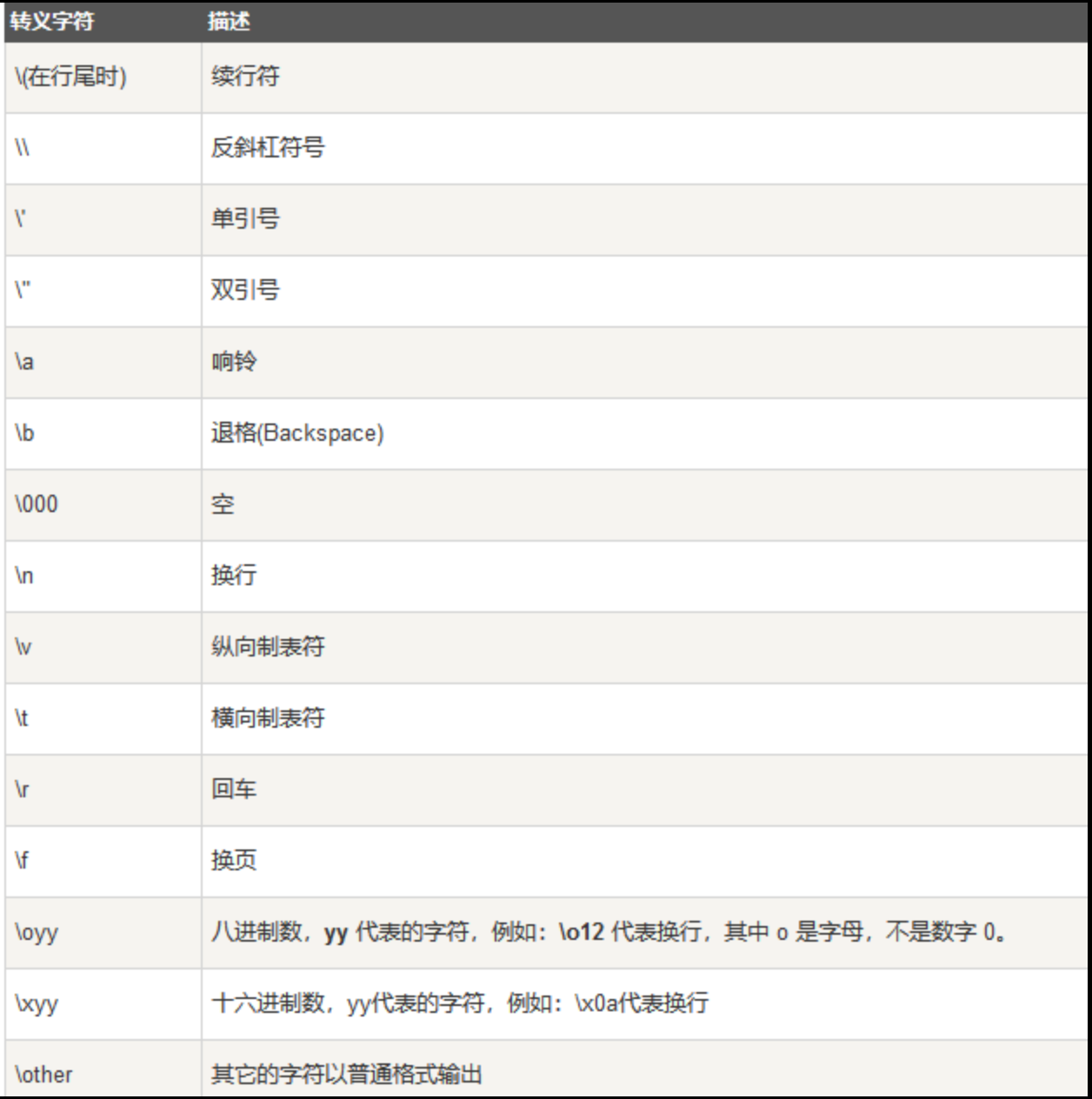
取消转义用r,print(r"\n")
格式化
字符串中%用于定义占位符,后面跟着一个格式化字符,用于指定变量的类型。例如:
%s表示插入一个字符串。%d表示插入一个整数。%f表示插入一个浮点数。%%表示插入一个百分号符号本身。
# 整型和字符串占位符
name = 'alice'
age = 12
print("Name is %s, age is %d." % (name, age))

# 输出百分号
percent = 75
print("Percentage is %d%%" % percent)

#输出浮点数的小数点后位数。%10.2f表示输出浮点数占10个字符的宽度,小数点后保留两位。数字不足将用空格填充
print('PI\'s vaule is:%10.2f' % 3.1415926)
# 仅输出小数点后两位数字
print('PI\'s vaule is:%.2f' % 3.1415926)
# 添加左对齐
print('PI\'s vaule is:%-10.2f' % 3.1415926)
字符串方法
text = "Hello, world!"

# 首字母大写
text.capitalize()
# 首字母每个标点符号后面的小写都变大写
text.title()
# 所有字母转换为大写
text.upper()
# 所有字母转换成小写
text.lower()
# 大小写反转
text.swapcase()
# 字符串居中,变量表示一共多宽,用什么符号做占位符
text.center(40,'-')

# 按符号分开
words = text.split(" ")
# 统计词频,Counter方法会以字典的形式输出单词和词频
from collections import Counter
word_count = Counter(words)

#查找元素或子串,查不到就返回-1
text.find('Hello') # 会返回H的索引,0。

# 连接字符串,用于将序列用某种连接符连接成新的字符串
seq=['a','b','c']
'-'.join(seq) # a-b-c
''.join(seq) # abc

# 子串/元素替换
text.replace(","," ") # 把,替换为空格

#分割字符串,返回列表
str = "abc def"
str.split() # ['abc','def'] 默认用空白作为分割符
str.split('c') # ['ab','def']
str.split(' ', 2) # 指定分割次数:最多从前到后分割两次,后面的原封不动
"".split() # 空格分割空字符串,返回空列表

# 去除首尾字符
text = "\t abc \t"
# 去掉首尾空白字符
text.strip()
# 去掉首尾指定字符
text.strip('!')
# 对开头字符去除
text.lstrip()
# 对末尾字符去除
text.rstrip()
文件处理
读取
在 Python 中,文件操作是通过内置的 open() 函数来实现的。你可以使用不同的模式打开文件,如:
'r'只读模式'w'写入模式(会覆盖原有内容)'a'追加模式
操作完成后必须关闭文件,释放系统资源。Python 提供了 file.close() 方法:
file = open('example.txt', 'r')
content = file.read()
file.close()
也推荐使用 with 语句,它会自动处理文件关闭,即使在代码块中发生了异常:
# as 关键字用于将上下文管理器(在这里是 open('example.txt', 'r'))返回的对象(文件对象)绑定到一个变量上(这里是file)。
with open('example.txt', 'r') as file:
    content = file.read()
读取全部内容
with open('example.txt', 'r') as file:
    #读取全部文件内容
    content = file.read()
file.read() 特点
- 优点:操作简单,适合处理文件内容较小的情况。
- 缺点:如果文件很大,可能会占用大量内存,因为整个文件内容都会被加载到内存中。
- 适用场景:文件大小适中,能够完全载入内存时使用。当你需要对整个文件的内容进行处理或分析时使用。
逐行读取
with open('example.txt', 'r') as file:
    #读取全部文件内容
    for line in file:
        print(line, end='')
for line in file 特点
for line in file:逐行读取文件的内容。file 对象是一个可迭代对象,每次迭代返回一行文本。
- 优点:适合处理大文件,因为不会一次性将整个文件加载到内存中。逐行读取会将当前行加载到内存,而不是整个文件。
- 缺点:处理文件时,每次读取一行,可能会稍微增加处理时间。
- 适用场景:文件较大时,逐行处理可以有效减少内存使用。你需要处理文件的每一行,可能会根据每行内容执行不同操作。
读取每行到列表
with open('example.txt', 'r') as file:
    lines = file.readlines() # lines是一个列表,每个元素是文件中的每一行
    print(lines)
for line in lines
    print(line, end='')
file.readlines() 特点
file.readlines():读取文件中的所有行,并将每一行作为列表中的一个元素返回。
- 优点:能够在内存中以列表的形式处理文件的每一行,可以随机访问每一行。
- 缺点:会一次性将整个文件加载到内存中,因此适用于文件较小的情况。对于大文件,可能会导致高内存使用。
- 适用场景:文件大小适中,能够完全载入内存时使用。需要多次访问文件中的不同部分或行时使用,因为你可以通过列表索引来访问特定的行。
写入
覆盖模式w
with open('example.txt', 'w') as file:
    # 写入文件,覆盖掉原有内容
    file.write("Hello from Python\n")
追加模式a
with open('example.txt', 'a') as file:
    # 写入文件,追加内容
    file.write("Hello from Python\n")
写入多行
lines = ['Line1\n', 'Line2\n']
with open('example.txt', 'w') as file:
    # 把一个列表的元素作为每一行写到文件中
    file.writelines(lines)
文件目录管理
Python 的 os 和 shutil 模块提供了文件和目录的管理功能,包括创建、删除、重命名文件和目录等。
重命名文件
import os
# 如果打开的文件不存在,会帮你创建出来
with open('file-test.txt', 'w') as file:
    file.write("Hello from Python\n")

# 重命名
os.rename('file-test.txt', 'file-demo.txt')

# 检查某个文件是否存在
if os.path.exists('file-demo.txt'):
    print("Rename successfully")
else:
    print("Rename failed")
复制文件
import os, shutil
with open('file-test.txt', 'w') as file:
    file.write("Hello from Python\n")

# 复制文件,指定文件名
shutil.copy('file-test.txt','file-copy.txt')

# 检查结果
if os.path.exists('file-copy.txt'):
    print("Copy successfully")
else:
    print("Copy failed")
移动文件
import os, shutil
with open('file-test.txt', 'w') as file:
    file.write("Hello from Python\n")

# 移动文件,指定目标路径和文件名
shutil.move('file-test.txt','dir1/sub_dir/file-new.txt')

# 检查结果
if os.path.exists('dir1/sub_dir/file-new.txt'):
    print("Move successfully")
else:
    print("Move failed")
删除文件
import os
with open('file-test.txt', 'w') as file:
    file.write("Hello from Python\n")
# 删除文件
os.remove("file-test.txt")
# 检查删除结果
if not os.path.exists("file-test.txt"):
    print("Delete file successfully")
else:
    print("Delete file failed")
创建/删除目录
import os
# 创建目录
os.makedirs("empty_dir")
# 删除目录
os.rmdir("empty_dir")
if not os.path.exists("empty_dir"):
    print("Dir delete successfully")
else:
    print("Dir delete failed")
创建层级目录:
import os
# 创建层级目录
os.makedirs('dir1/sub_dir')
# 检查
if os.path.exists('dir1/sub_dir'):
    print("Dir created successfully")
else:
    print("Dir created failed")
案例:处理大文件
处理大文件时,直接将整个文件读入内存可能会导致内存不足或程序变得非常慢。因此,逐块读取文件内容是一种更有效的方式,这样可以逐步处理文件内容,而不是一次性加载整个文件。这种方法特别适合处理大型日志文件、大型数据文件等。
重点
file.read(chuck_size) 参数控制每次读取的字节数。
import os

chuck_size = 1024 # 每次读取1024字节的数据(1 KB)

with open("example.txt", "w") as file:
    file.write('A' * 1024 * 1024) # 文件写入1MB数据

# 逐块读取文件
with open ('example.txt', 'r') as file:
    while True:
        # file.read()加参数意思是每次读取多少字节的数据
        chunk = file.read(chuck_size)
        # 如果没有更多数据,chuck为空,退出循环
        if not chunk:
            break
        print("Chunk read:")
        print(chunk[:100])  # 打印前100个字符
案例:备份数据到目录
重点
os.path.exists()判断路径是否存在os.makedirs()创建目录os.path.isdir()判断是否是目录shutil.copytree(src, dest, dirs_exist_ok=True, copy_function=shutil.copy2)复制目录及metadata,并默认覆盖已存在shutil.copy2(src, dest)复制文件以及metadata
import os, shutil
from datetime import datetime

# 定义源目录和目标目录
src_dir = 'path/to/source/directory'
dest_dir = 'path/to/destination/directory'

# 创建源目录和目标目录,如果它们不存在
if not os.path.exists(src_dir):
    print(f"Source directory '{src_dir}' does not exist, creating it now.")
    os.makedirs(src_dir)

if not os.path.exists(dest_dir):
    print(f"Destination directory '{dest_dir}' does not exist, creating it now.")
    os.makedirs(dest_dir)

# 创建子目录,如果子目录已经存在,不抛异常
os.makedirs(os.path.join(src_dir,'subdir1'), exist_ok=True)
os.makedirs(os.path.join(src_dir,'subdir2'), exist_ok=True)

# 创建文件
with open(os.path.join(src_dir, 'file1.txt'), 'w') as f:
    f.write('This is file 1.')

with open(os.path.join(src_dir, 'file2.txt'), 'w') as f:
    f.write('This is file 2.')

# 获取时间戳,datetime.now() 返回的是从Unix epoch到现在的秒数,strftime() 方法将其格式化为字符串
timestamp = datetime.now().strftime('%Y%m%d-%H%M%S')

# 用时间戳命名备份目录
backup_dir = os.path.join(dest_dir, f'backup_{timestamp}')
os.makedirs(backup_dir, exist_ok=True)

# 开始备份
for item in os.listdir(src_dir):
    # for循环获取到的是相对路径,所以需要使用os.path.join()来拼接源目录和目标目录
    src_item = os.path.join(src_dir, item)
    dest_item = os.path.join(backup_dir, item)

    # 判断目标是否是目录
    if os.path.isdir(src_item):
        # 复制目录。
        # dirs_exist_ok=True 目标目录如果存在不会抛异常,会覆盖掉。
        # copy_function=shutil.copy2 把源目录的metadata也复制过去
        shutil.copytree(src_item, dest_item, dirs_exist_ok=True, copy_function=shutil.copy2)
    else:
        # 复制文件,metadata也会被复制
        shutil.copy2(src_item, dest_item)

print(f"Backup completed successfully to {backup_dir}")
案例:清理过期日志文件
重点
os.path.isfile()判断是否是文件os.path.getmtime获取文件最后修改时间
# 模拟生成日志文件
mkdir /path/to/logs -p
touch -t $(date -d "60 days ago" +"%m%d%H%M.%S") /path/to/logs/test_file_1.log
touch -t $(date -d "50 days ago" +"%m%d%H%M.%S") /path/to/logs/test_file_2.log
touch -t $(date -d "30 days ago" +"%m%d%H%M.%S") /path/to/logs/test_file_3.log
touch -t $(date -d "15 days ago" +"%m%d%H%M.%S") /path/to/logs/test_file_4.log
touch /path/to/logs/test_file_4.log
import os, time

log_dir = 'path/to/logs'

retention_days = 30
current_time = time.time()
cutoff = current_time - (retention_days * 86400)

for file in os.listdir(log_dir):
    # 获取绝对路径
    file_path = os.path.join(log_dir, file)

    # 检查是否是文件
    if os.path.isfile(file_path):
        file_mtime = os.path.getmtime(file_path)

        # 如果文件的修改时间早于保留截止时间,则删除
        if file_mtime < cutoff:
            try:
                os.remove(file_path)
                print(f"Deleted: {file_path}")
            except Exception as e:
                print(f"Error deleting {file_path}: {e}")
案例:批量重命名文件
重点
file.endswith()检测文件扩展名os.path.splitext()分离文件名和扩展名,[0]是文件名,[1]是扩展名
import os

file_dir = './'

old_ext = '.txt'
new_ext = '.bak'

for file in os.listdir(file_dir):
    if file.endswith(old_ext):
        # 把文件名和扩展名分离成list,[0]是文件名,[1]是扩展名
        base_name = os.path.splitext(file)[0]
        new_file_path = os.path.join(file_dir, base_name + new_ext)
        old_file_path = os.path.join(file_dir, file)
        os.rename(old_file_path, new_file_path)
        print(f'Renamed {old_file_path} to {new_file_path}')
正则表达式
规则
正则表达式的基本组成部分:
- 普通字符:直接匹配自身的字符,如
a匹配字符'a'。 - 元字符(Metacharacters):具有特殊含义的字符。
.匹配除换行符外的任何单个字符。^匹配字符串的开始。$匹配字符串的结束。*匹配前一个字符零次或多次。+匹配前一个字符一次或多次。?匹配前一个字符零次或一次,或将其用于非贪婪匹配(可以有也可以没有)。[]匹配括号内的任何一个字符,如[abc]匹配'a'、'b'或'c'。[^abc]匹配除了abc之外的字符。|表示逻辑或(OR)如a|b匹配'a'或'b'。()用于分组,提取子字符串或改变运算的优先级。- 转义字符:用于将元字符当作普通字符对待,通常使用反斜杠
\,如\.匹配一个点。 - 量词(Quantifiers):指定匹配的数量。
{n}: 精确匹配n次。{n,}: 至少匹配n次。{n,m}: 匹配n到m次。
示例:匹配邮箱地址
从You can contact us at info@example.com or support@service.org.中匹配出邮箱地址,可以用
[A-Za-z0-9._%+-]+@[A-Za-z0-9.-]+\.[A-Za-z]{2,4}
[A-Za-z0-9._%+-]+:匹配邮箱的用户名部分,允许字母、数字和一些特殊符号(如._%+-等)@:匹配邮箱的@符号。[A-Za-z0-9.-]+:匹配邮箱的域名部分(如"example"或"service")。\.:匹配"."符号。[A-Za-z]{2,4}:匹配域名的后缀部分(如"com"或"org")
字符匹配
正则表达式中的字符具有特殊的含义:
- 普通字符:如
a, b, 1, 9等,表示它们本身。 - 点号
.:匹配除换行符以外的任意单个字符。
import re
text = 'hello'
pattern = 'h.llo'

# re.match返回的是一个匹配对象,如:<re.Match object; span=(0, 5), match='hello'>
if re.match(pattern, text):
    match = re.match(pattern, text)
    # 用match.group返回匹配到的字符串'hello'
    print("Match successfully:", match.group())
else:
    print("Match failed.")
字符集匹配
[hH] 匹配其中的某一个字符,换言之只要待匹配的字符在[]里面存在,就能匹配上
import re
text = 'hello'
pattern = '[hH]ello'

if re.match(pattern, text):
    match = re.match(pattern, text)
    print(f"Match well: {match.group()}")
重复匹配
+:匹配前面的模式一次或多次,换言之必须得有。
*:匹配前面的模式零次或多次,换言之有没有都行。
?:匹配前面的模式零次或一次。
贪婪模式与非贪婪模式
+和*会尽可能多的匹配字符,即==贪婪模式==。- 在
+或*后面加上?表示从贪婪模式转变为==非贪婪模式==,最小匹配。
例如:
text = '<h1>RUNOOB-菜鸟教程</h1>'
pattern = '<.*>' # 匹配到整个'<h1>RUNOOB-菜鸟教程</h1>'
pattern = '<.*?>' # 仅匹配到'<h1>'
import re
pattern = 'a+b*c' # a匹配一次或多次,b匹配零次或多次,c就是匹配c

print(re.match(pattern, 'aabbc').group())
print(re.match(pattern, 'aabbccpoiupio').group()) # 这表示字符串的子串符合正则,也能匹配出來
print(re.match(pattern, 'ac').group())
特殊字符匹配
\d:匹配数字\s:匹配空白字符\S:匹配非空白字符\w:匹配字母/数字/下划线任一种
import re
pattern = r'\d+\s\w+' # 匹配一个或多个数字,匹配一个空白字符,匹配一个或多个字母数字下划线
text = '123 abc'
print(re.match(pattern, text).group())
边界匹配
^:匹配以某个字符串开头,^后面的字符串都参与判断。
import re
pattern = '^hello'
print(re.match(pattern, 'hello world').group())
$:匹配字符结尾
\b:匹配单词边界。单词边界是单词和空格之间的位置。单词边界确保匹配的字符串是一个完整的"单词"部分。
\B:匹配非单词边界,是除了单词边界(空格、标点、特殊字符)任何其他位置。
text1 = 'hello 192.168.1.1 world'
text2 = 'hello192.168.1.1world'
pattern = r'\b192.168.1.1\b' # 表示192.168.1.1前面和后面都必须是一个非单词字符(空格、标点、特殊字符等)
result = re.match(pattern, text1) # 可以匹配上,因为前后都是空格
result = re.match(pattern, text2) # 匹配不上,因为前后都是字母,不满足单词边界
捕获组/非捕获组
捕获组
==捕获组==是由圆括号 () 包围的部分,会把每个分组里面匹配到的值保存起来,通过group(n)来查看,表示第n个捕获组的内容。
例如,在正则表达式 r'(foo)(bar)' 中:
(foo)是第一个捕获组。(bar)是第二个捕获组。
import re
text = '123-45-6789'
pattern = r'(\d{3})-(\d{2})-(\d{4})'
result = re.match(pattern, text)
if match:
    print(result.group(0)) # 捕获完整输出'123-45-6789'
    print(result.group(1)) # 第一个捕获组'123'
    print(result.group(2)) # 第二个捕获组'45'
    print(result.group(3)) # 第三个捕获组'6789'
非捕获组
如果你不需要保存单个()匹配的子串,可以使用==非捕获组==。非捕获组用 (?:...) 表示,不会保存单个()匹配的内容。
例如:pattern = r'(?:\d{2})-(?:\d{4})':
(?:\d{2})是一个非捕获组,它会匹配两位数字但不作为捕获组保存。(?:\d{4})是另一个非捕获组。
对比
使用普通捕获组:
import re
pattern = r'([0-9]{1,3}\.){3}'
string = "192.168.0."
match = re.search(pattern, string)
if match:
    print(match.groups()) # 输出 ('0.',) 只保存了最后一次捕获
为什么只显示最后一次的捕获?
- 正则表达式
([0-9]{1,3}\.){3}包含一个捕获组([0-9]{1,3}\.),它会捕获 1 到 3 位数字,后面跟一个点号。 {3}表示这个捕获组会重复三次,也就是说它会尝试匹配三段类似于192.、168.、0.的内容。- 在正则表达式中,捕获组在每次匹配时会覆盖之前的匹配结果。由于捕获组会被最后一次匹配的内容覆盖,最终
groups()只返回最后一次匹配到的0.
使用非捕获组:
import re
pattern - r'(?:[0-9]{1,3}\.){3}'
string = "192.168.0."
match = re.search(pattern, string)
if match:
    print(match.groups()) # 输出 ('192.168.0.',)
只需要对 1-3 位数字 + 一个点号 的模式进行三次重复匹配,而不需要保存每次匹配的内容,因此用到了非捕获组 (?:[0-9]{1,3}\.),输出了全部匹配。
正则表达式函数
查找
re.match()
- 从字符串的==开头==匹配,开头匹配不上就直接失败。
import re
pattern = r'\d{3}-\d{3,8}'
print(re.match(pattern, '123-45678').group())
print(re.match(pattern, '12345-45678').group())
print(re.match(pattern, 'w123-45678').group())
re.search()
-
可以从字符串的==任意位置==截取符合模式的子串。
-
但是只会匹配从前往后首次出现的匹配项。
import re
pattern = r'\d{3}-\d{3,8}'
text = 'My phone 123-1234567, and 987-6543210'
result = re.search(pattern, text)
print(f"Match well {result.group()}") if result else print("Match failed")
re.findall()
- 查找字符串中所有非重叠的匹配项,并以列表形式返回。
import re
pattern = r'\d{3}-\d{3,8}'
text = 'My phone 123-1234567, and 987-6543210'
result = re.findall(pattern, text) # result返回列表,直接print就行,不用group()方法
print(f"Match well {result}") if result else print("Match failed")
什么叫非重叠?
import re
pattern = 'aba'
text = 'ababa'
result = re.findall(pattern, text)
print(f"Match well {result}") if result else print("Match failed")
在字符串 "ababa" 中,虽然有两个 "aba" 出现的可能性(第一个从索引 0 开始,第二个从索引 2 开始),但 re.findall() 只会匹配第一次出现的 "aba",然后继续从匹配后的字符(即从索引 3 开始)进行查找。由于从索引 3 开始再没有 "aba" 出现,所以结果中只有一个匹配。
替换/拆分/预编译
re.sub()
-
re.sub()方法用于替换字符串中所有匹配的子串。 -
语法为
re.sub(pattern, repl, string, count=0), pattern是正则表达式repl是替换内容string是要处理的字符串count是可选参数,用于指定替换的最大次数(默认为 0,表示替换所有匹配项)
import re
pattern = r'\d{3}-\d{3,8}'
text = 'My phone 123-1234567, and 987-6543210'
new_text = re.sub(pattern,'xxx-xxxx',text)
print(new_text)
re.split()
- 根据模式中的匹配项来拆分字符串,并返回拆分后的列表。
import re
pattern = r'\s+' # 匹配一个或多个空白。可以直接用于句子拆分成列表
text = 'This is  a  test   string'
result = re.split(pattern,text)
print(result)
re.compile()
- 预编译正则表达式。预编译的正则表达式对象可以复用,以提高效率,特别是在多次使用同一正则表达式时。
re.compile()返回一个正则表达式对象,该对象可以使用match(), search(), findall(), sub()等方法。
import re
pattern = re.compile(r'\d{3}-\d{3,8}')
text = 'My phone 123-1234567, and 987-6543210'
result = pattern.match(text)
result = pattern.search(text)
result = pattern.findall(text)
result = pattern.sub('xxx-xxxx',text)
案例:解析日志文件中的IP地址
有一个log文件,需要提取出IP地址:
192.168.0.1 - - [28/Aug/2030:10:22:04 +0000] "GET /index.html HTTP/1.1" 200 2326
203.0.113.45 - - [28/Aug/2030:10:22:05 +0000] "POST /login.php HTTP/1.1" 200 342
192.168.0.2 - - [28/Aug/2030:10:22:06 +0000] "GET /dashboard HTTP/1.1" 200 128
import re
log_file = './example.txt'
#读取日志文件
with open(log_file, 'r') as f:
    logs = f.read()
    ip_pattern = re.compile(r'\b(?:[0-9]{1,3}\.){3}[0-9]{1,3}\b')
    ips = ip_pattern.findall(logs)
    for ip in ips:
        print(ip)
重点
- 用
\b匹配单词边界 (?:[0-9]{1,3}\.){3}非捕获组匹配重复的3个数字和\.作为IP地址的前三位。- IP地址的最后一位要单独匹配,仅是三位数字没有点
案例:批量替换配置文件中的某个配置项
有多个配置文件,你需要将 user1 改为 admin_user。
# config1.conf
DB_CONNECTION="mysql://user1:password@localhost/db1"
# config2.conf
DB_CONNECTION="mysql://user1:password@localhost/db2"
import re

config_files = ['config1.conf', 'config2.conf']
pattern = re.compile(r'(DB_CONNECTION="mysql://)([^:]+)(:password@localhost/[^"]+)')
new_user = 'admin_user'

for file in config_files:
    with open(file, 'r') as f:
        content = f.read()
    # with 退出之后,读取的文件内容还在
    new_content = pattern.sub(r'\1' + new_user + r'\3', content)
    with open(file, 'w') as f:
        f.write(new_content)
    print(f"Updated {file}")
重点
- 因为要替换这一句中间的内容,所以要把整个句子拆分成三部分,将匹配到的user1部分替换成新的值,再拼接起来。
- 匹配
:前面的一段用户名:[^:]+非冒号的字符出现一次或多次 - 匹配
"前面的一段db名:[^"]+非双引号的字符出现一次或多次 r'\1'代表第一个捕获组(第一个())匹配到的值,r'\3'代表第三个捕获组(第三个())匹配到的值
案例:检查配置文件中的缺失项
检查某些配置文件,确保它们包含所需的所有配置项。比如,你需要确认所有配置文件都包含 max_connections 这个设置项。
#config1.conf
max_connections=100
timeout=30
# config2.conf
timeout=30
import re

config_files = ['config1.conf', 'config2.conf']
required_para = 'max_connections'
# 直接匹配对应的关键词
pattern = re.compile(f'{required_para}')

for file in config_files:
    with open(file, 'r') as f:
        content = f.read()
    if not pattern.search(content):
        print(f"{file} is missing required parameter \'{required_para}\'")
案例:提取分析系统资源使用情况
从系统生成的资源监控报告中提取 CPU 和内存的使用情况,并求平均值。
CPU Usage: 45%
Memory Usage: 73%
CPU Usage: 55%
Memory Usage: 80%
- 如果是从文件中读取
import re

report_file = 'example.txt'

# 用捕获组专门获取保存数字部分
cpu_pattern = re.compile(r'CPU Usage:\s*(\d+)%')
mem_pattern = re.compile(r'Memory Usage:\s*(\d+)%')

# 思路是把匹配出来的cpu和mem使用率分别保存到列表中,对列表值求平均
with open(report_file, 'r') as f:
    content = f.read()

# 匹配出来的是字符串列表
cpu_usage = cpu_pattern.findall(content)
mem_usage = mem_pattern.findall(content)

# 计算平均值需要整形列表,用list(map(int,))来转换
cpu_avg = sum(list(map(int, cpu_usage))) / len(cpu_usage)
mem_avg = sum(list(map(int, mem_usage))) / len(mem_usage)

print(f"Average CPU Usage: {cpu_avg}%")
print(f"Average Memory Usage: {mem_avg}%")
- 如果是从字符串中读取
import re

report = """
CPU Usage: 45%
Memory Usage: 73%
CPU Usage: 55%
Memory Usage: 80%
"""
cpu_pattern = r'CPU Usage:\s*(\d+)%'
mem_pattern = r'Memory Usage:\s*(\d+)%'

# 直接构造整型数组
cpu_usage = [int(match) for match in re.findall(cpu_pattern,report)]
mem_usage = [int(match) for match in re.findall(mem_pattern,report)]

avg_cpu = sum(cpu_usage) / len(cpu_usage)
avg_mem = sum(mem_usage) / len(mem_usage)
print(f"Average CPU Usage: {avg_cpu}%")
print(f"Average Memory Usage: {avg_mem}%")
练习:用户管理系统
题目:开发一个用户管理系统:
- 用户注册:用户输入姓名、年龄、手机号。信息存入字典,用户存储在列表中。
- 用户查询:输入手机号、查找并显示已注册用户的信息
- 用户列表:显示所有已注册用户的信息
- 退出系统。
要求:
- 使用while实现菜单交互
- 输入手机号必须是11位数字,否则提示错误
# 用户信息列表
users = []

def user_register():
    name = input("Please input name:")
    age = input("Please input age:")
    phone = input("Please input phone number:")

    if len(phone) != 11 or not phone.isdigit():
        print("Phone number should be 11 digits.")
        return

    user = {
        'name': name,
        'age': age,
        'phone': phone
    }
    users.append(user)
    print(f"User {name} registered successfully.")

def user_search():
    phone = input("Please enter phone number to search:")
    for user in users:
        if user['phone'] == phone:
            print(f"Found user {user['name']} whose phone number is {user['phone']}.")
            return
    print("User not found.")

def user_lists():
    if not users:
        print("No users registered.")
    for user in users:
        print(f"User name: {user['name']}, age: {user['age']}, phone number: {user['phone']}")

def main():
    while True:
        print("\n=====User management system=====")
        print("1. Register user")
        print("2. Search user")
        print("3. List all users")
        print("4. Exit system")

        choice = input("Please enter number to select function:")

        if choice == '1':
            user_register()
        elif choice == '2':
            user_search()
        elif choice == '3':
            user_lists()
        elif choice == '4':
            print("Existing...Thanks for using.")
            break
        else:
            print("Invalid input, please re-select.")

main()