Azure VM and VMSS
Related Notes
Azure VM Architecture
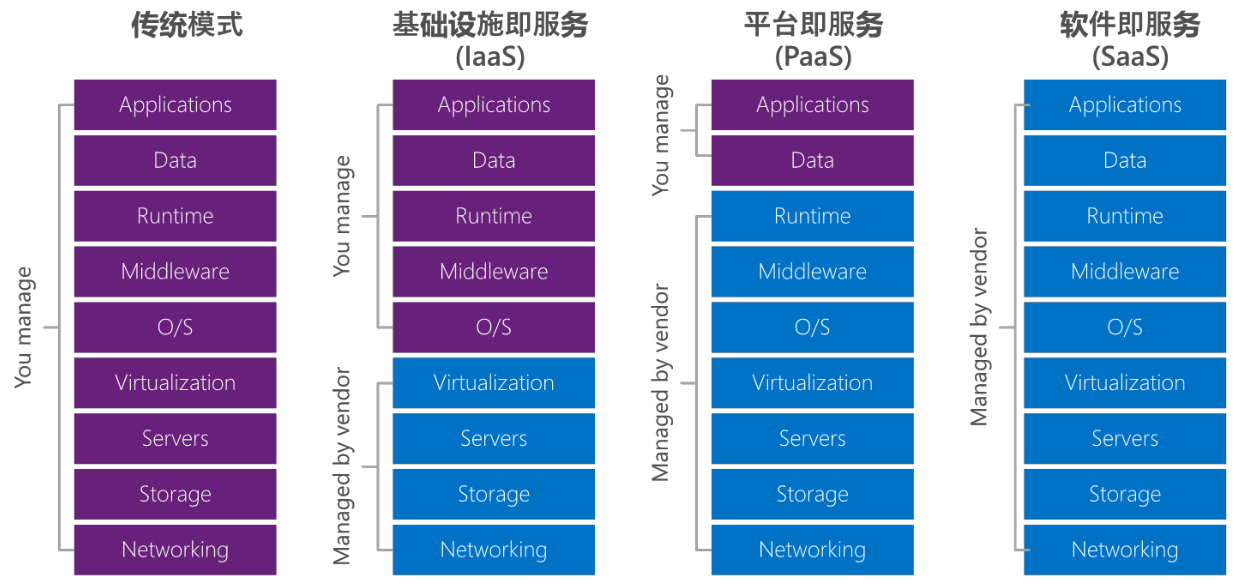
VM - IaaS Service
- IaaS: Cloud provides servers, virtualization, storage, and networking; users configure dev environments, manage apps and data
- PaaS: Cloud provides complete dev environment; users develop apps and manage data
- SaaS: Cloud provides ready-to-use applications; users consume directly
VM Physical Node Architecture
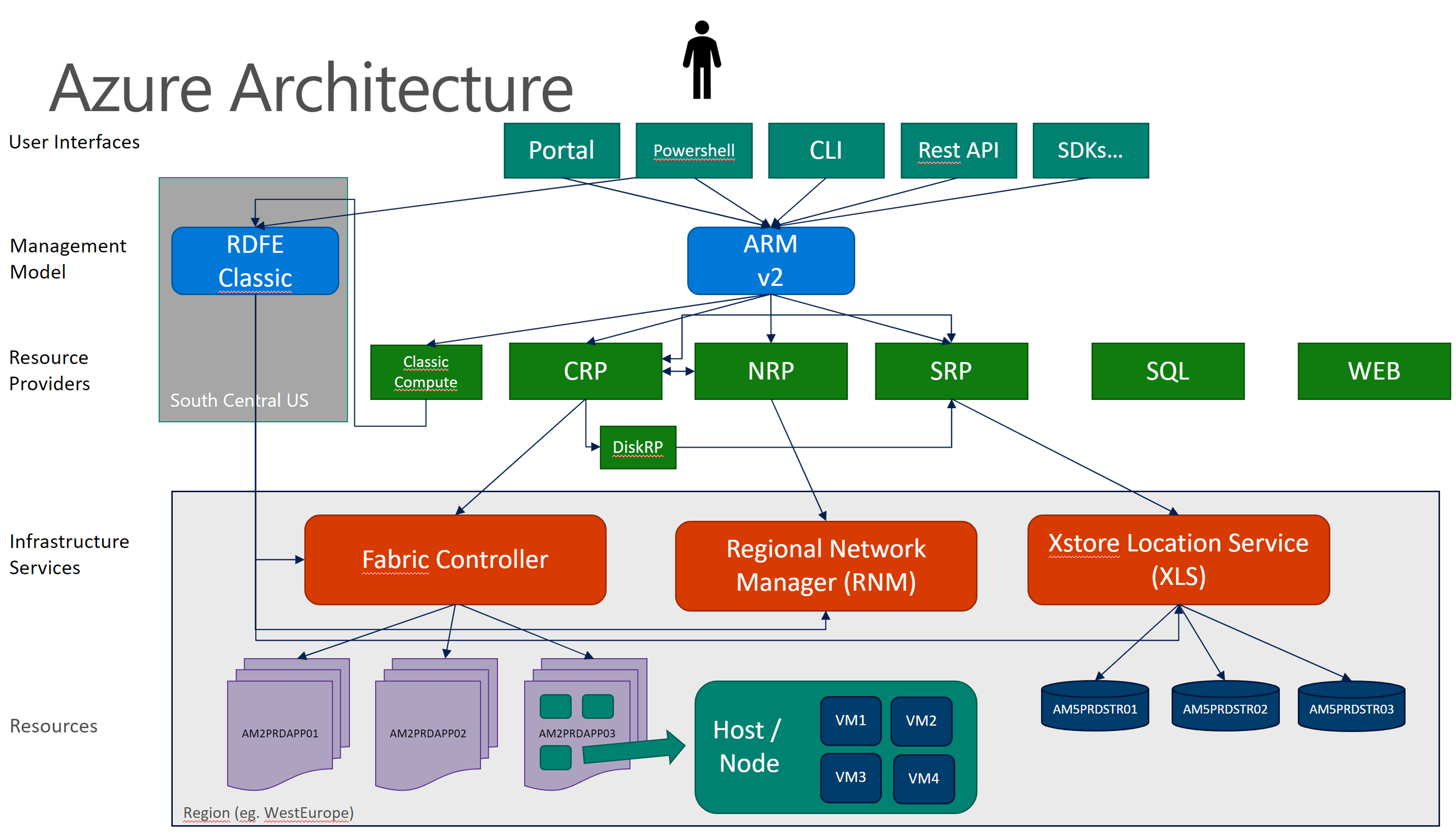
VM is deployed in Windows Server physical machines, which reside on racks. Racks have management hardware called Fabric, controlled by Fabric Controller.
Fabric receives definitions for hardware, networking, and other resources. It controls datacenter resource allocation, manages service lifecycles, monitors heartbeats, and handles failures. Datacenter servers form clusters of approximately 1000, also called blades. Clusters belong to different fault domains; each cluster is managed and deployed by FC.
Fabric capabilities:
- Run process service model files
- Allocate compute and network resources (provisioning)
- Prepare nodes
- Configure networking
- Provide service-health management
VM Deployment Architecture
Fabric
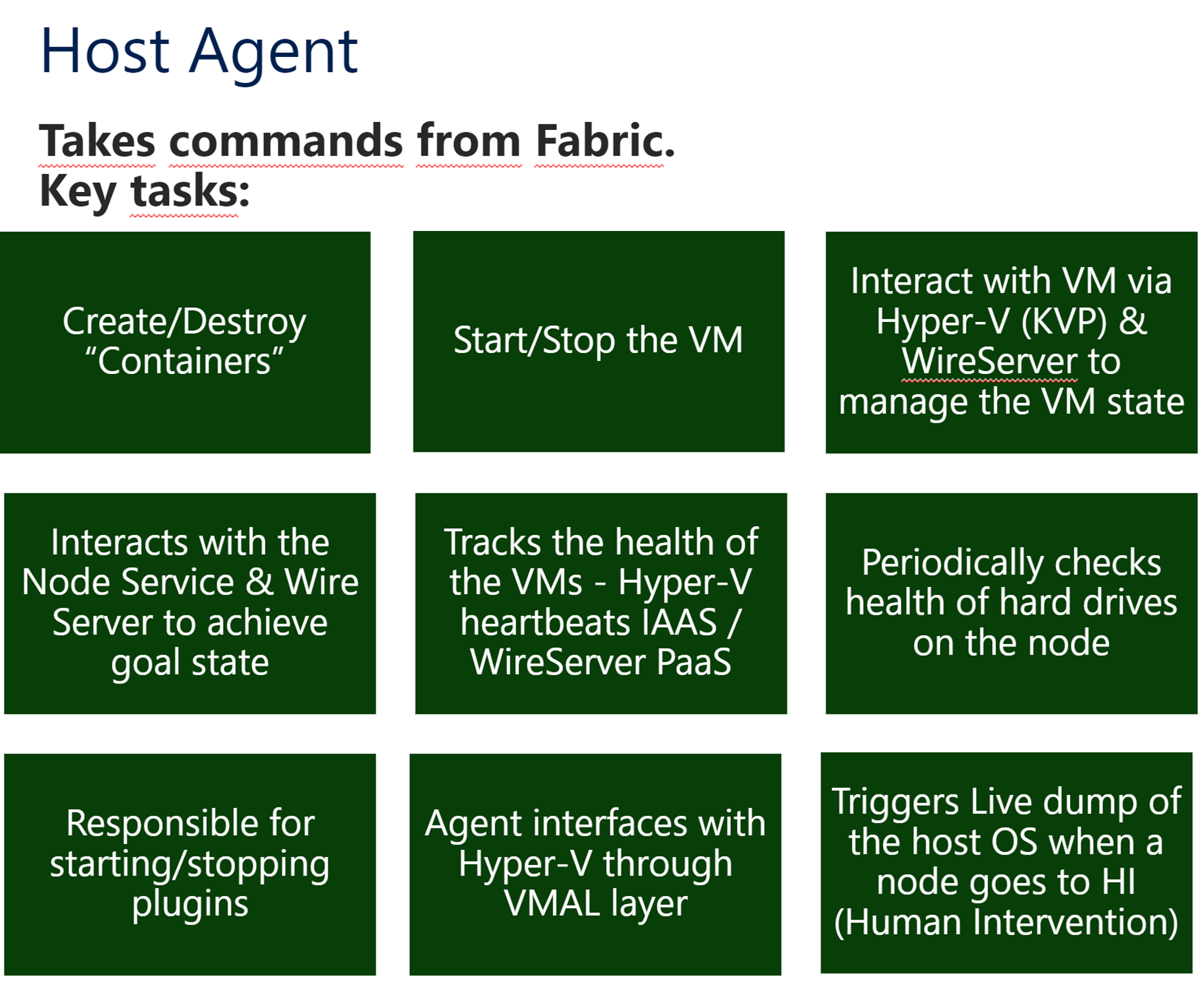
Host Agent
Fabric creates nodes (physical nodes where VMs reside). Physical nodes have a Host Agent:
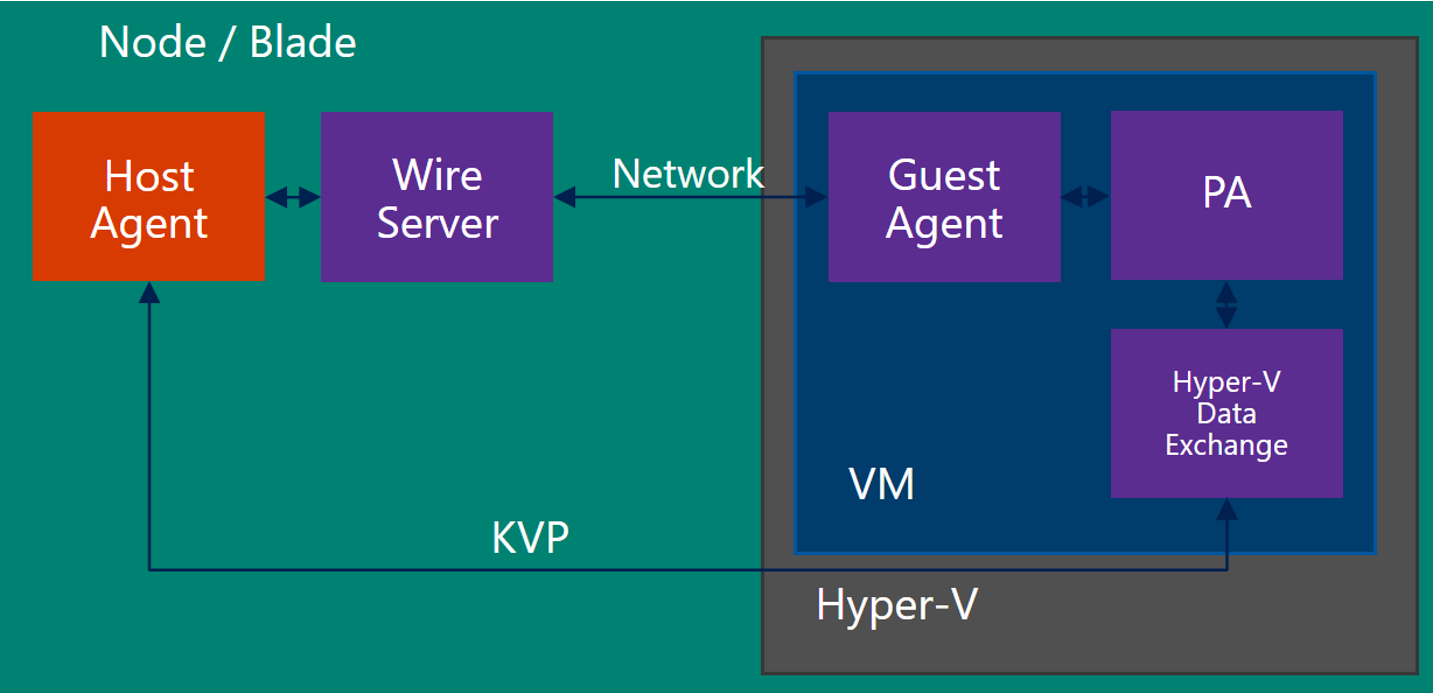
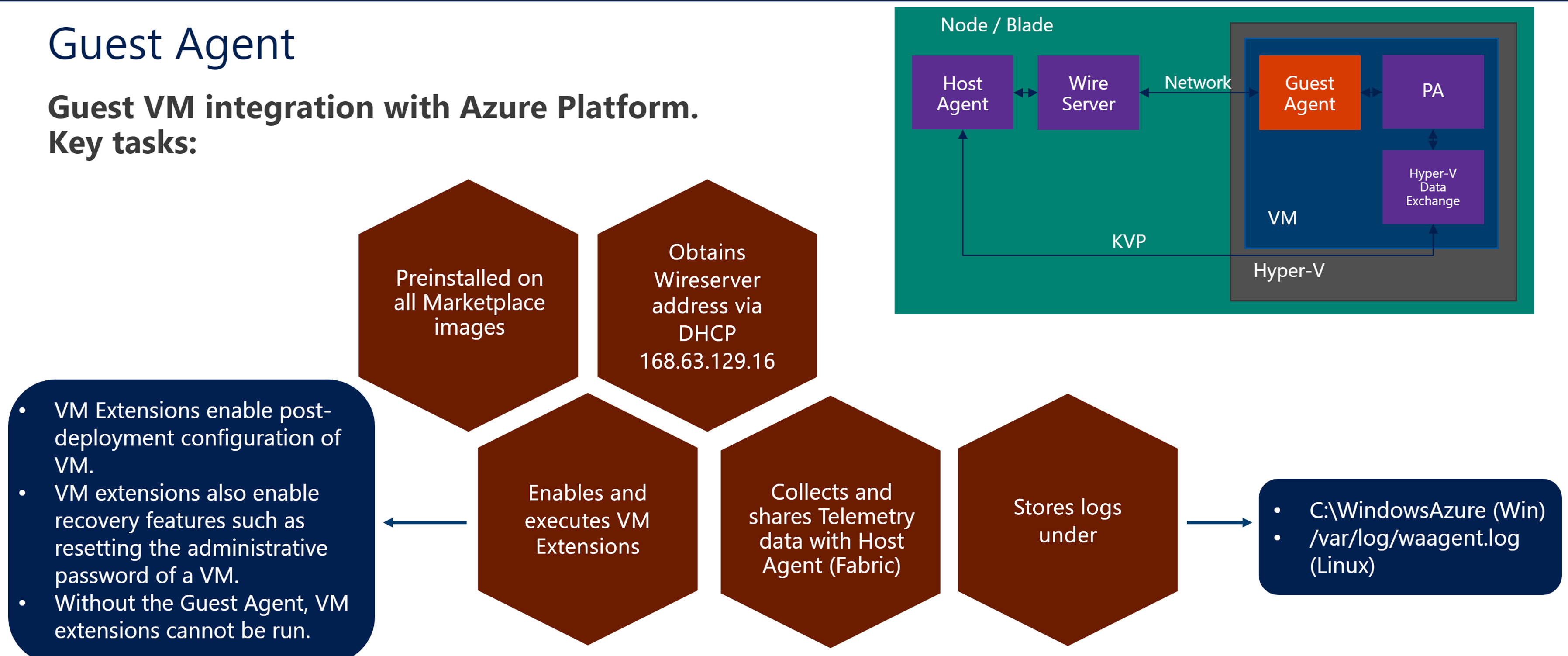
Guest Agent
Physical nodes contain multiple VMs. VMs have a Guest Agent:
Guest Agent functions:
Manually Reinstall Guest Agent (waagent)
# centos7 lab test:
# uninstall waagent
systemctl stop waagent
waagent -deprovision -force
rm -rf /var/lib/waagent

# install waagent
service network restart
yum install -y git
# if python2.7 is not installed, install it
pkg install python27
pkg install Py27-setuptools27
ln -s /usr/local/bin/python2.7 /usr/bin/python
git clone https://github.com/Azure/WALinuxAgent.git
cd WALinuxAgent
python setup.py install --register-service
waagent --version
systemctl status waagent
Wire Server
Guest Agent communicates with Host Agent through Wire Server. Wire Server docs:
What is IP address 168.63.129.16? | Microsoft Learn
Azure Instance Metadata Service for virtual machines - Azure Virtual Machines | Microsoft Learn
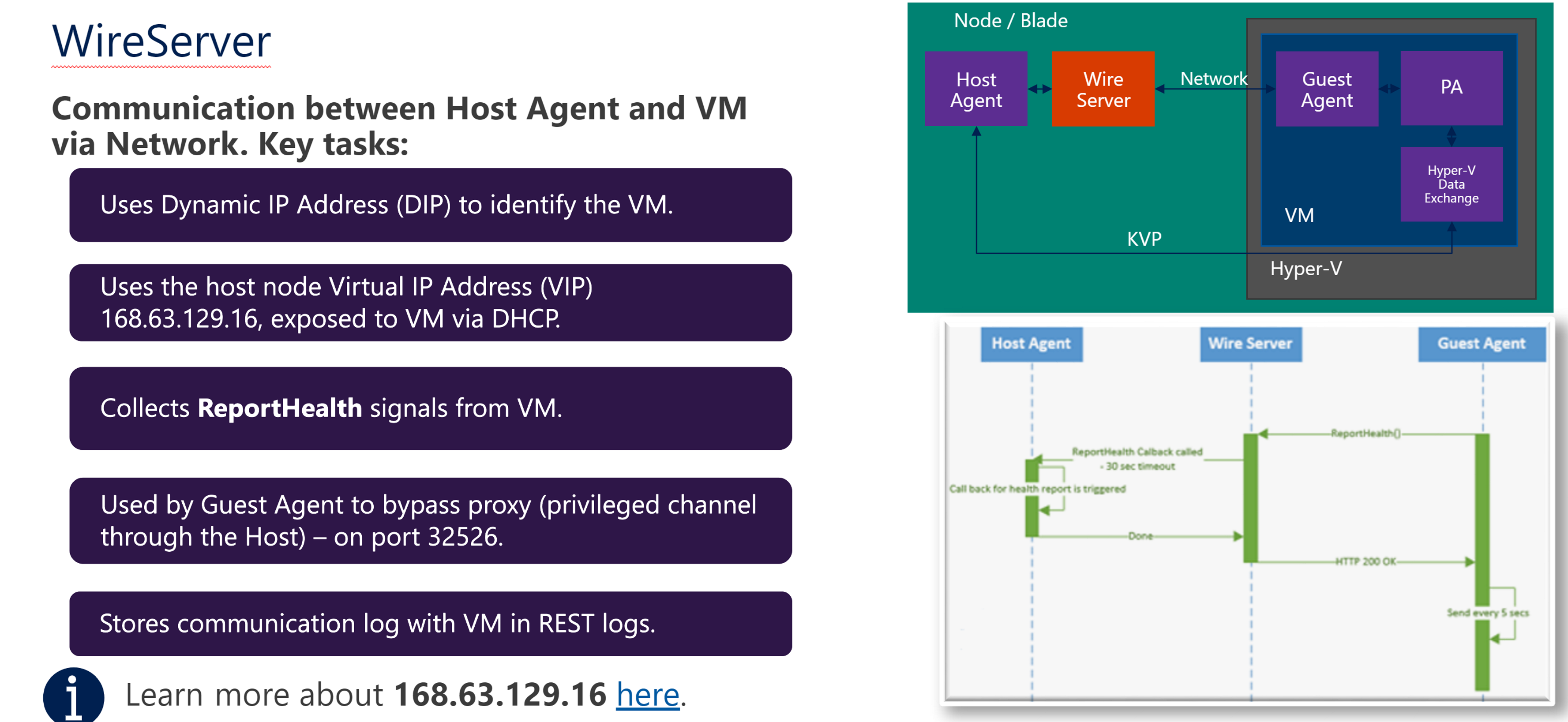
Wire Server troubleshooting:
- What is IP address 168.63.129.16? | Microsoft Learn
- What is IP address 168.63.129.16? | Microsoft Learn
Wire Server Communication
VM Agent communicates with Azure platform to report status. VM gets IP and DHCP through 168.63.129.16.
The VM Agent requires outbound communication over ports 80/tcp and 32526/tcp with WireServer (168.63.129.16).
These should be open in the local firewall on the VM. Communication on these ports with 168.63.129.16 is not subject to configured NSGs.
168.63.129.16 can provide DNS services to the VM. If not desired, outbound traffic to 168.63.129.16 ports 53/udp and 53/tcp can be blocked in the local firewall.
Check connectivity:
Windows OS:
Test-NetConnection 168.63.129.16 -Port 80
Test-NetConnection 168.63.129.16 -Port 32526
Linux OS:
telnet 168.63.129.16 80
telnet 168.63.129.16 32526
Azure Resource Manager
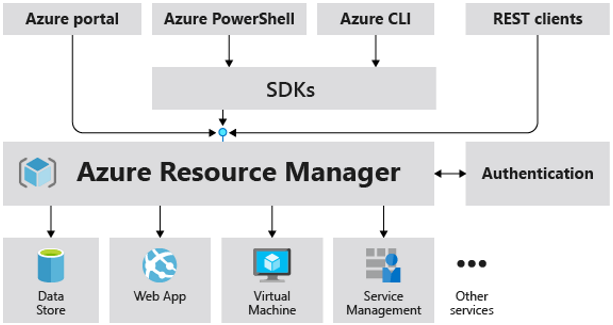
Users operate Azure resources through Azure Tools, all requests are received by ARM which performs the corresponding operations:
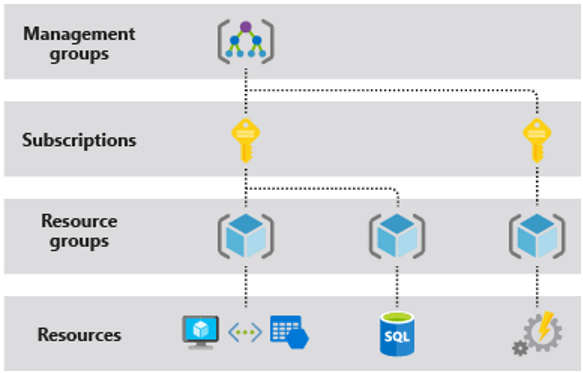
ARM Template: JSON files defining resource infrastructure and configuration, enabling automated deployment of identical environments.
Example of VM deployment:
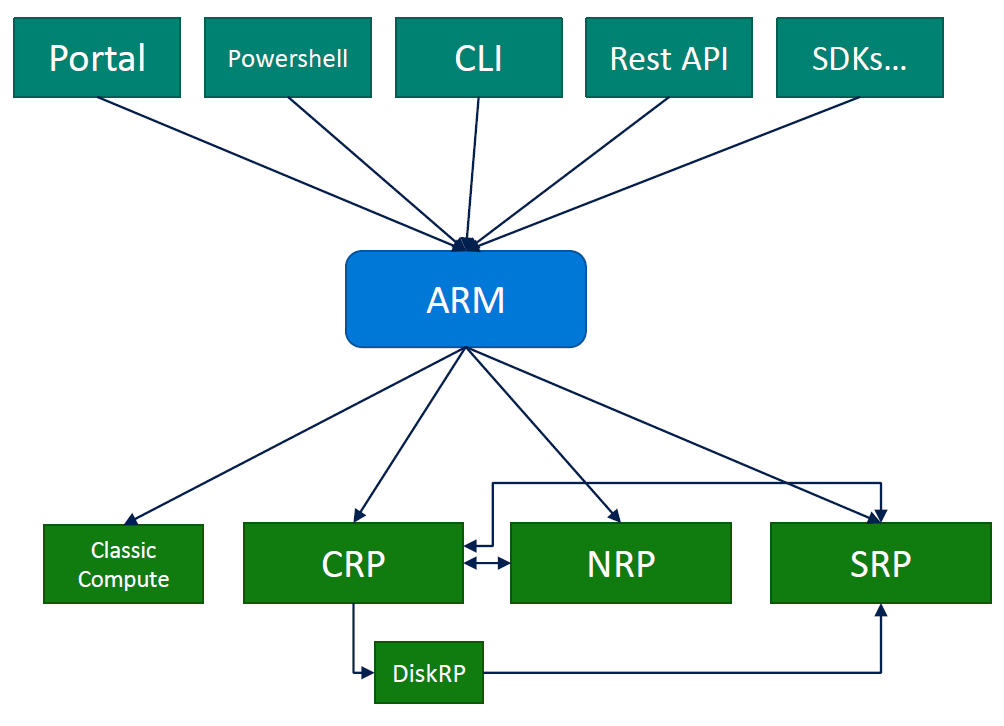
VM ARM Deployment Process
SRP, CRP, NRP etc. create corresponding resources respectively:
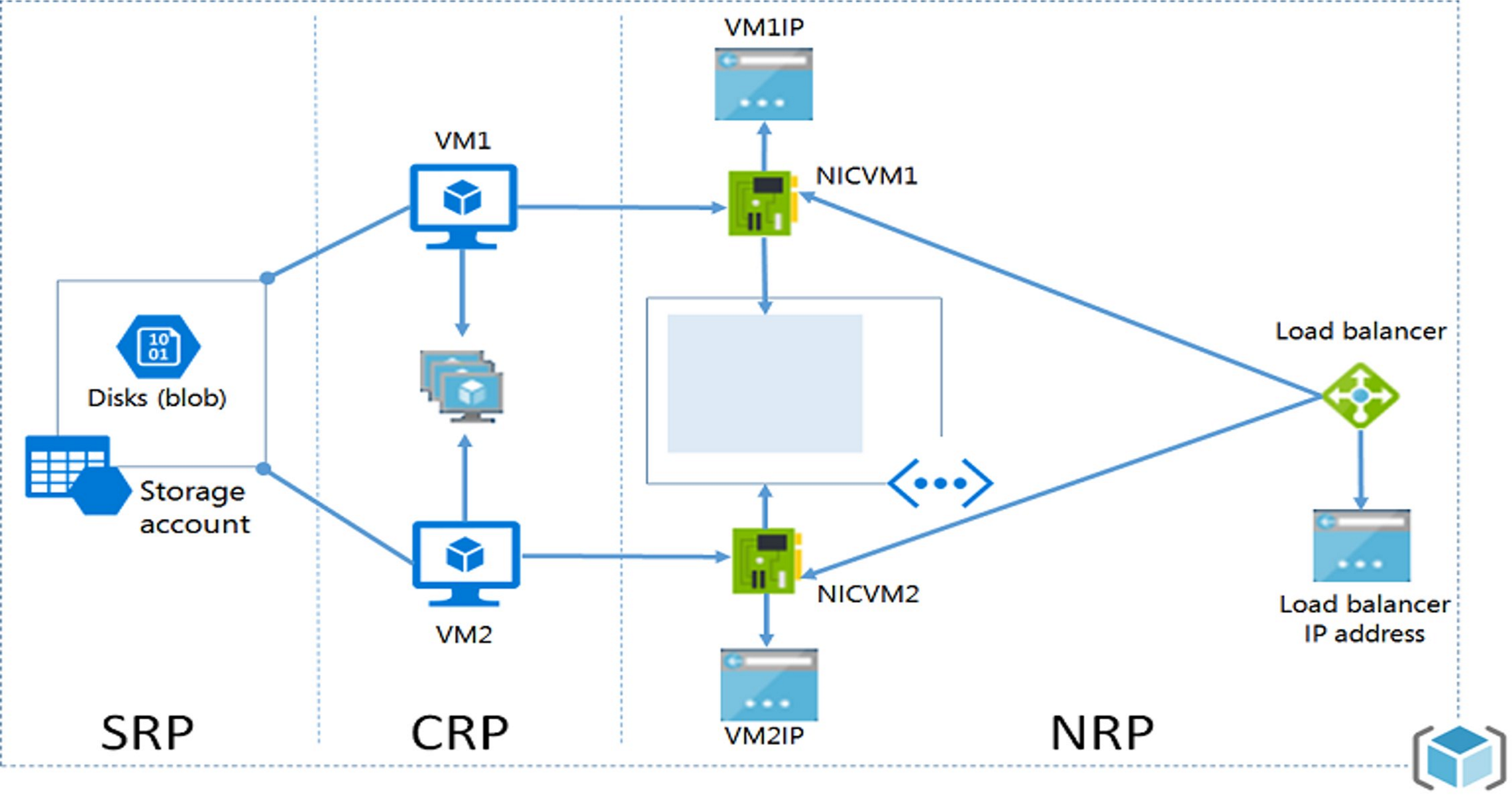
VM Regional Code
| Region | Code |
|---|---|
| China North | bjb |
| China North2 | bjb2 |
| China East | sha |
| China East2 | sha2 |
VM Platform Maintenance
维护和更新 - Azure Virtual Machines | Microsoft Docs
Maintenance and updates - Azure Virtual Machines | Microsoft Docs
Types
VM maintenance can be grouped by whether it requires a restart:
https://docs.azure.cn/zh-cn/virtual-machines/maintenance-notifications
- If maintenance does not require a reboot, Azure pauses the VM for a few seconds during host update. These maintenance operations are applied fault domain by fault domain. The process stops if any warning health signals are received. Maintenance requiring reboot sends a notification.
- If maintenance requires a reboot, the system notifies the planned maintenance time. A window of approximately 35 days is provided for self-service maintenance.
Memory-Preserving Updates
Memory-preserving updates typically complete within ~10 seconds. For this type of deployment, the platform does not send notifications. However, you can obtain platform maintenance/deployment info through VM Metadata Service. See Azure 中适用于Windows VM 的计划事件.
Alerts
VM health status alerting. Common monitoring options:
- Scheduled Events - Monitor the following events, see Azure 中适用于Windows VM 的计划事件 | Azure Docs:
- Platform-initiated maintenance (e.g., VM reboot, live migration, memory-preserving updates)
- VM running on degraded host hardware predicted to fail soon
-
User-initiated maintenance (e.g., user restart or redeploy VM)
-
Resource Health - Monitor VM state (start, shutdown, etc.). See Azure 资源运行状况概述 | Azure Docs & 通过Azure 资源运行状况支持的资源类型 | Azure Docs
-
Azure Log Analytics Agent - More powerful monitoring and alerting service, such as monitoring heartbeats and CPU through log queries. See Azure 中的警报和通知监视概述 | Azure Docs
Azure VM Basics
VM Availability Options
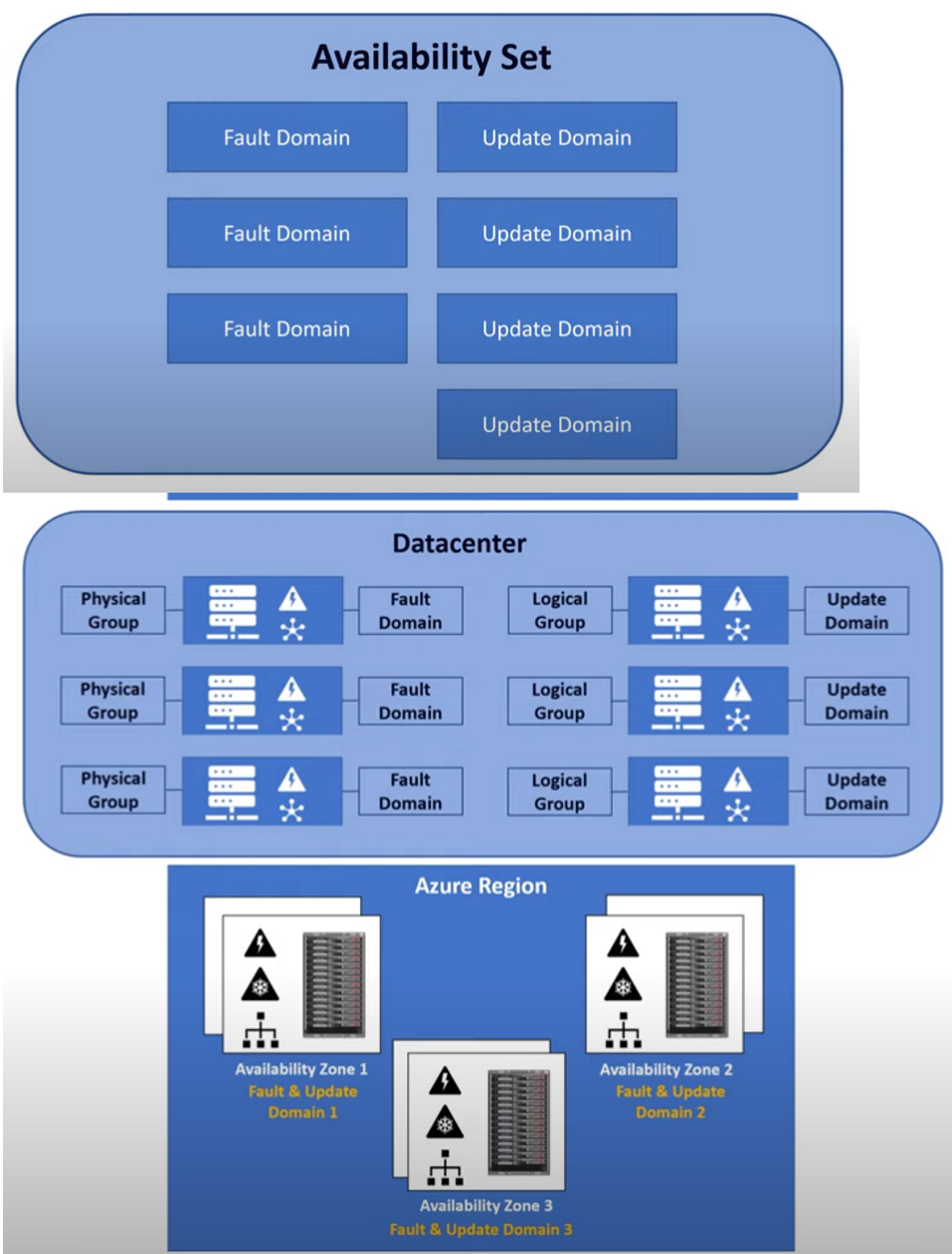
- Fault Domain
- Physical grouping
- In a datacenter, servers are divided into groups, each using the same power supply and network equipment
-
If one group's power or network fails, only that group is affected
-
Update Domain
- Logical grouping
- When servers need patches or upgrades requiring restarts, not all servers restart at once
-
Divided into update domains, only one group restarts at a time
-
Availability Sets
- Within a datacenter, an availability set consists of multiple fault domains and update domains (configurable)
-
A logical concept: VMs in an availability set are distributed across different fault and update domains for high availability
-
Availability Zones
- Physically independent zones with separate power, networking, etc.
- Deploy application replicas across zones for resilience. A VM is placed in a zone; Azure does not automatically replicate that VM to another zone.
- Each availability zone consists of one or more datacenters with independent power, cooling, and networking; regions that support availability zones have at least three zones. See Availability zones for VMSS.
- Can be understood as a larger-scale fault domain and update domain
- Protects against entire datacenter failures
-
Azure China limited support (North3 supports)
-
Regional Pair - Paired regions ensure upgrades affect only one, with priority recovery for one
-
VM Scale Sets - Build load-balanced clusters
Create VM in Availability Set
使用 Azure PowerShell 在可用性集中部署 VM - Azure 虚拟机 | 微软文档
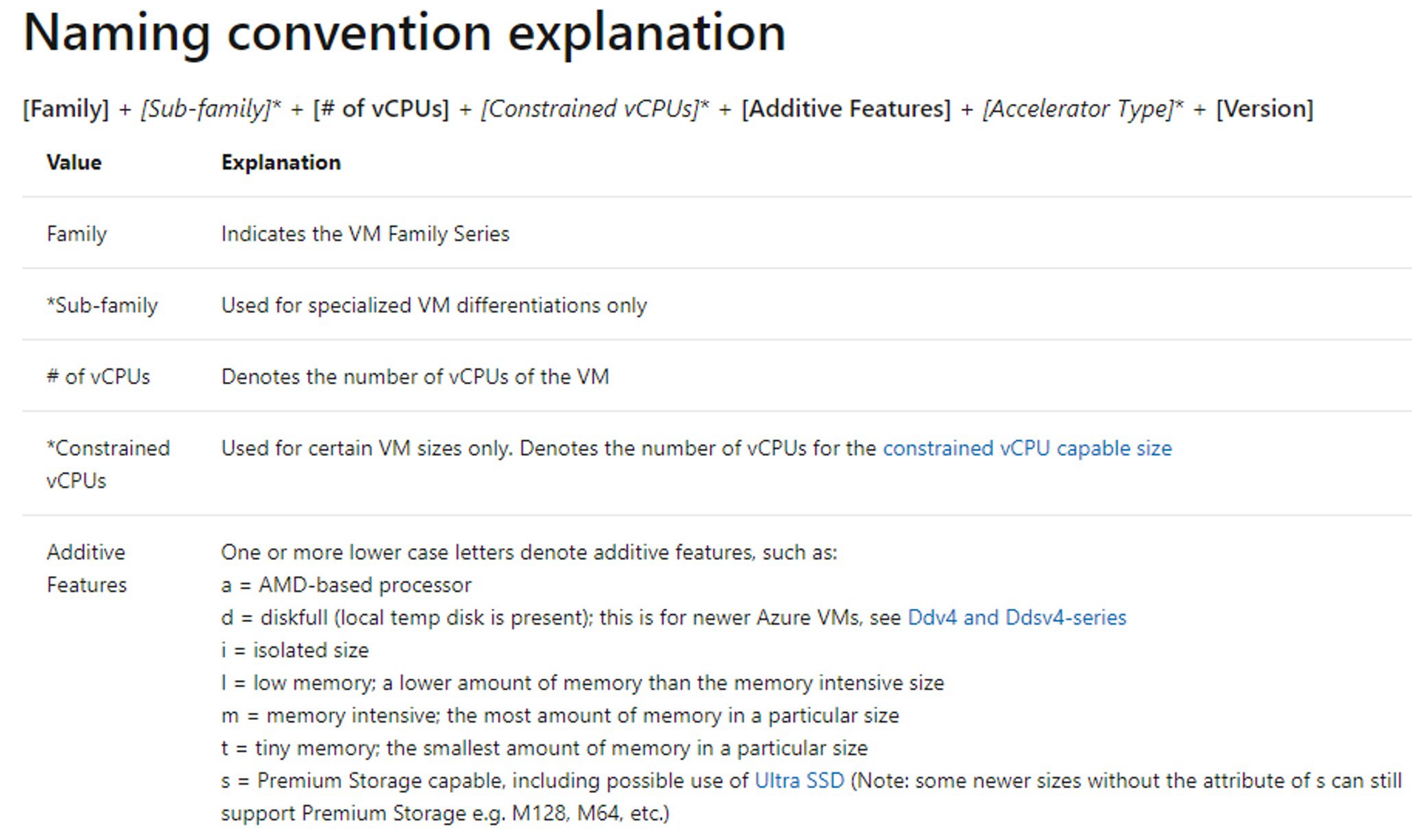
VM SKU Naming Convention
VM Extension
Azure VM Extensions are small programs providing deployment, configuration, and automation.
How to install:
- Using Azure CLI, PowerShell, ARM, Portal
Prerequisites:
- Need Azure Linux Agent installed to manage VM extensions
- Some extensions have OS limitations
Related docs:
- https://docs.microsoft.com/en-us/azure/virtual-machines/extensions/agent-windows
- Azure Linux VM Agent Overview | 微软文档
- azure-linux-extensions/CustomScript | GitHub
- https://docs.microsoft.com/en-us/azure/virtual-machines/windows/extensions-customscript?toc=%2Fazure%2Fvirtual-machines%2Fwindows%2Ftoc.json
Troubleshooting Extensions
Extensions are managed by VM Agent. Log location: /var/log/azure/<extension name>/extension.log
- Troubleshoot the Azure Linux Agent - Virtual Machines | Microsoft Docs
- Troubleshooting Azure Windows VM Agent - Virtual Machines | Microsoft Learn
- Troubleshoot Agent and extension issues - Azure Backup | Microsoft Learn
Common Extensions
VMAccess
What?
- VM disk error, forgotten root password, or deleted SSH private key - need recovery, which normally requires datacenter console access
- VMAccess Extension can access the console to reset Linux access
- Requires
waagent.serviceprocess running on Linux
How?
- When VM can access Azure Linux Agent:
- Use Azure CLI command with parameters to set directly
- Create JSON file with reset parameters, use Azure CLI to read and apply
Steps:
Run Command
Can run custom commands in a VM.
Run Command Script Location
View run command scripts on Linux VM at /var/lib/waagent/run-command/download. script.sh is the script, stdout is the execution result.
VM Image and Snapshot
What is Image:
- Image is a copy of a complete VM or OS disk only. Use a configured VM as template to create multiple identical VMs.
- Before creating VM from image, remove personal account info, then generalize.
Difference between Image and Snapshot:
- Image contains all disks of the VM, can be used to create new VMs
- Snapshot is a copy of a single disk
- Image creation requires deprovision to clear personal info; snapshot does not
How:
- For managed disk VMs, Portal has a direct capture option
Docs:
Azure VM Boot Diagnostics
In Portal, use screen display / serial log to view VM boot issues. Use screen display to check VM state when it becomes unresponsive.
- Linux:
- sos report: 如何收集Linux 虚拟机的诊断日志 | Azure Docs
- Most system logs are in
/var/log/: e.g.,/var/log/boot.logfor boot info;/var/log/securefor SSH, sudo, user add, password changes;/var/log/messagesfor important system info -
rsyslogd manages logs. Configure in
/etc/rsyslog.conf -
Windows System Event Log:
C:\Windows\System32\winevt\LogsC:\Windows\Memory.dmpif availableC:\Windows\Minidump\if available
Azure VM Troubleshooting
Recovery VM
Recovery VM Process
When a VM has boot or SSH issues, create a snapshot of the OS Disk, then create a Recovery Disk from the snapshot and attach it to a recovery VM for troubleshooting.
-
Create snapshot of issue VM's OS Disk, create new Recovery Disk from snapshot.
-
Create a Dv3 or Ev3+ VM in the same Region as the Recovery Disk. Install Windows Server 2016+ (supports nested virtualization), enable Hyper-V:
Install-WindowsFeature -Name Hyper-V -IncludeManagementTools -Restart
- Attach Recovery Disk to the VM, offline the disk, create Hyper-V VM with it:
- Computer Management - Disk Management - Offline
- Hyper-V Manager - New VM - Attach a virtual hard disk later
- VM Settings - IDE Controller0 - Hard Drive - Physical Hard Disk - Apply
-
Get into console
-
Access VM console for troubleshooting or repair.
This method is suitable when Guest Agent is inaccessible, or for resetting local passwords. Related docs:
- 如何通过 Hyper-V Console 方式修复虚拟机无法访问的问题 | Azure Docs
- Nested Virtualization | Microsoft Docs
- 在 Windows Server 上安装 Hyper-V 角色 | 微软文档
- How to reset local Linux password on Azure VMs - Virtual Machines | Microsoft Learn
- How to Boot into Single User Mode in CentOS/RHEL 7 (tecmint.com)
Mount OS Disk
When the filesystem is mounted as read-only due to incorrect fstab settings and internal files cannot be modified, the Hyper-V boot mode approach is difficult. Workaround: attach the issue disk as a data disk to another VM, mount it to a directory, edit fstab. After changes, re-attach to the nested VM for further operations.
Mount Disk + chroot
Related doc: How to troubleshoot the chroot environment in a Linux Rescue VM - Virtual Machines | Microsoft Learn
Azure VMSS
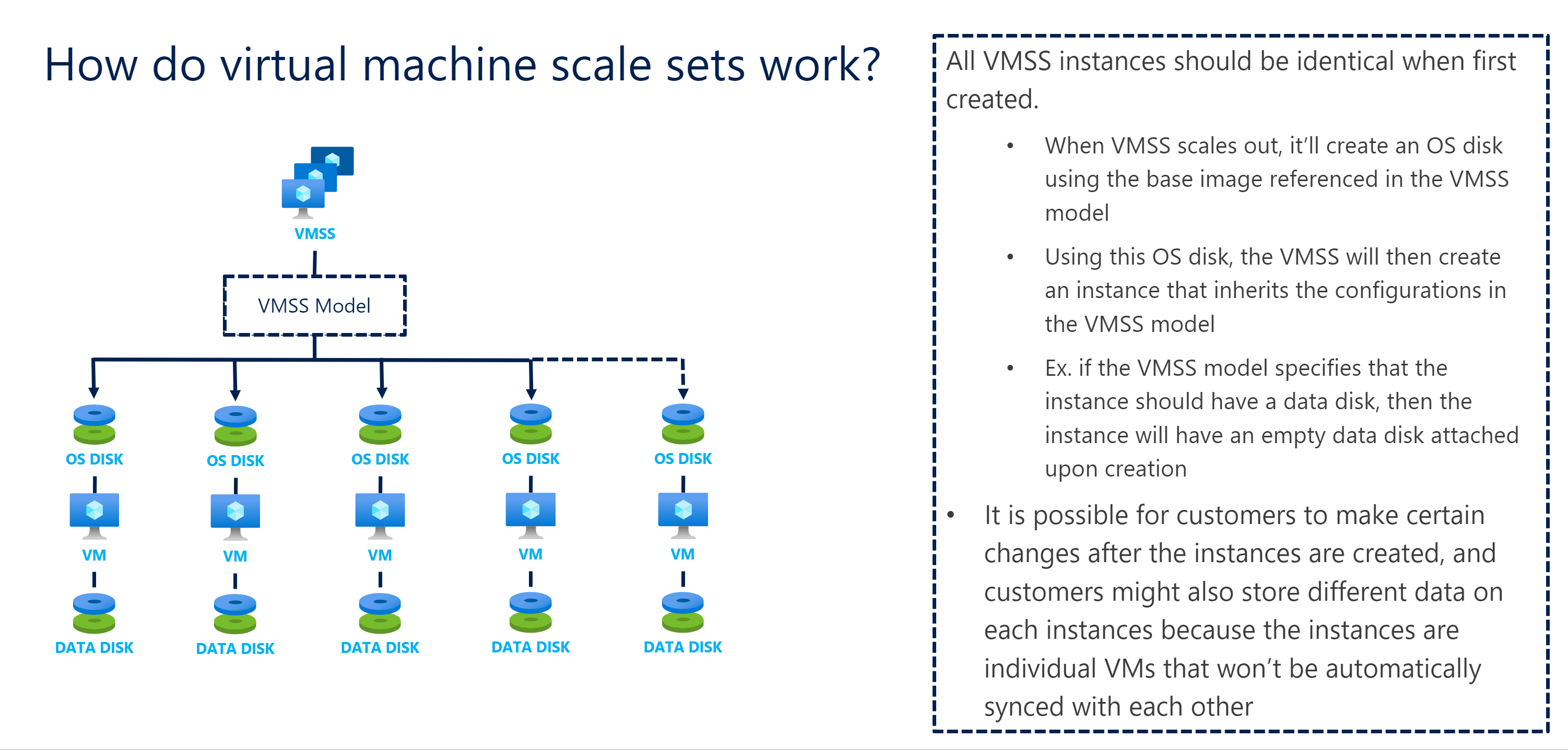
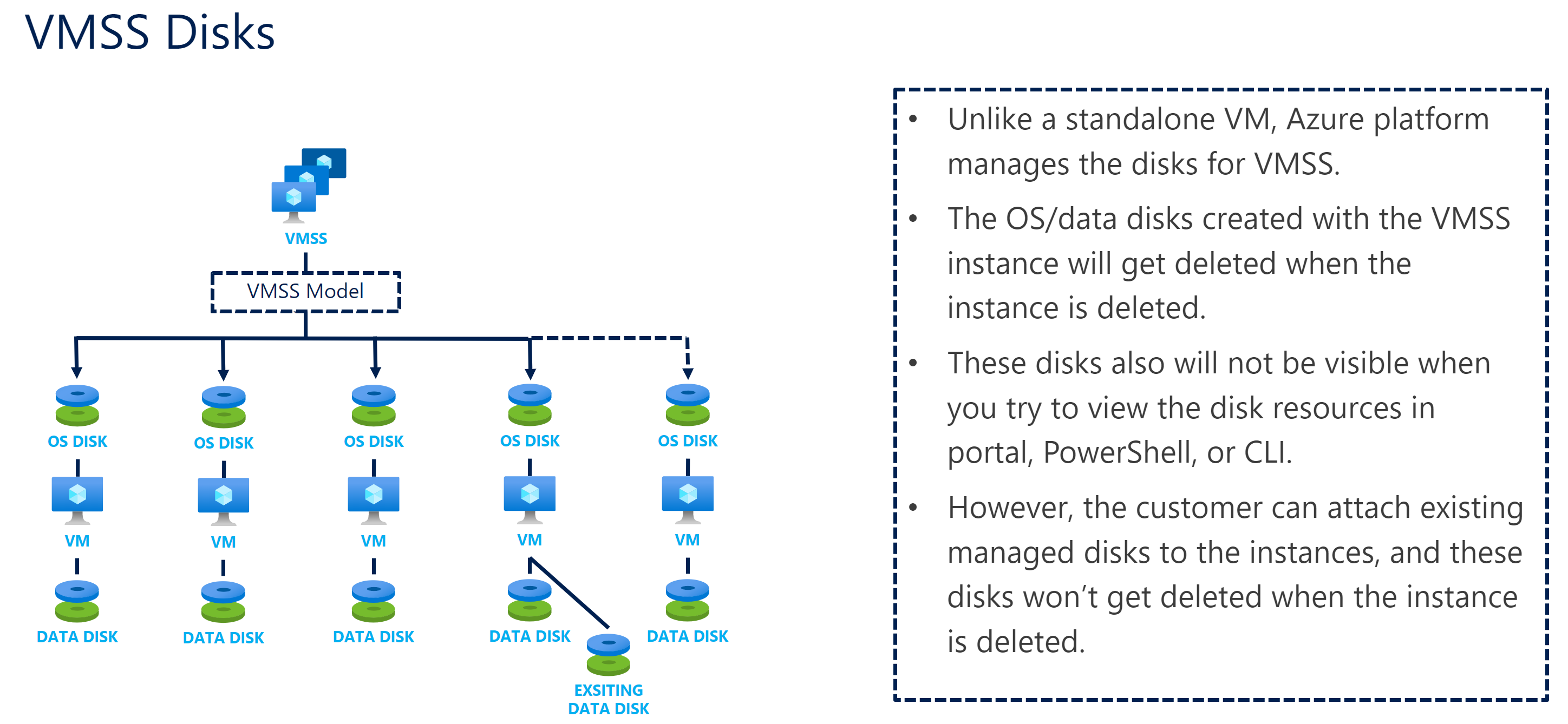
VMSS (Virtual Machine Scale Sets) manages a group of VM instances with centralized configuration, updates, and scaling. When configured with a load balancer, it can distribute traffic across instances. VMSS is useful for workloads whose capacity changes over time.
VMSS - Load Balancer
Load Balancer works at the transport layer. Methods to access VMSS:
-
Assign each VM its own public IP (expensive)
-
Use Load Balancer with NAT:
- Assign public IP to LB, LB routes traffic through each VM's port to individual VM instances
- By default, NAT rules are added to LB, forwarding remote connection traffic to each VM on given ports
VMSS Auto-scale
VM Security
Azure VM Security Best Practices
- Overall VM protection: See Azure 中IaaS 工作负载的安全性最佳做法 | Azure Docs
- OS-level protection: Deploy Microsoft Antimalware for Azure | Azure Docs to identify and remove viruses and malware (note: mining software is not in scope)
- OS updates: See 为Azure VM 启用Azure 自动化更新管理 | Azure Docs for enabling update management and scheduled batch updates
- Performance monitoring: See 使用Azure Monitor 代理从虚拟机收集事件和性能计数器 | Azure Docs for configuring performance monitoring and alerts
- Security posture: See Microsoft Defender for Servers 概述 | Azure Docs for configuring Microsoft Defender for Cloud, with integration to Microsoft Sentinel Detect threats with built-in analytics rules in Microsoft Sentinel | Azure Docs for monitoring OS-level anomalies
- Network configuration: See 限制直连Internet连接 for configuring NSG and enabling JIT (Just-In-Time) access control. Enable NSG flow logs via NSG 流日志 - Azure Network Watcher | Microsoft Learn