AKS Basics
Related Notes
- Azure/3_AKS-workload-identity
- Azure/4_AKS-SecretProviderClass-KeyVault
- Azure/6_Azure-Networking
- Azure/7_ACR-ACI
Architecture and Components
Container Runtime
Cluster configuration in Azure Kubernetes Services (AKS) - Azure Kubernetes Service | Microsoft Docs
Cluster Components
Control Plane
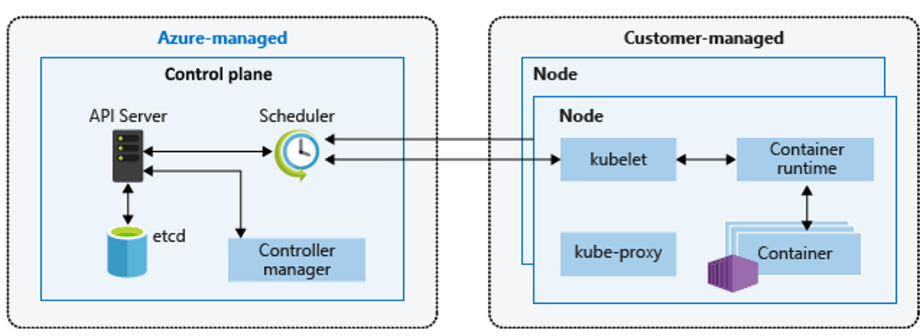
Managed by Azure. Components:
| Component | Description |
|---|---|
| apiserver | Unified external entry point for the cluster, RESTful API. Provides auth, API registration, discovery |
| scheduler | Responsible for cluster resource scheduling, scheduling Pods to nodes per policy |
| etcd | Stores all cluster resource object information |
| controller | Maintains cluster state: deployment, fault detection, auto-scaling, rolling updates |
Worker Nodes
Managed by users. Components:
| Component | Description |
|---|---|
| kubelet | Master's representative on node, manages container lifecycle via container runtime |
| kubeproxy | Maintains node network proxy, manages services and IPs, implements load balancing |
| container runtime | Runs containers, manages images and Pod execution. AKS Linux 1.19+ uses containerd; from 1.20, containerd available in preview, Docker was still default |
- In AKS, node VM images are based on Ubuntu Linux or Windows Server 2019
Resource Reservation
- AKS consumes node VM resources for cluster management. Node resources may be less than total VM resources. Check allocatable resources:
kubectl describe node [NODE_NAME]
Reservation Rules
- Larger nodes have more resources reserved for cluster management
- Define requests for scheduling and limits for maximum usage. Container runtimes enforce limits through cgroups.
-
Reserved resources include:
-
CPU
- 1000m equals one CPU.
- More host cores mean more reserved resources.
- Memory
- Mi uses a 1024-based unit: 1 Mi = 1024 × 1024 bytes.
- The kubelet reserves memory; the note below uses a 750 Mi hard eviction threshold.
- Tiered kubelet reservation:
- 25% of the first 4 GB
- 20% of the next 4 GB (up to 8 GB)
- 10% of the next 8 GB (up to 16 GB)
- 6% of the next 112 GB (up to 128 GB)
- 2% of anything above 128 GB
Memory Reservation Calculation
For a node with 7 GB memory, 34% is non-allocatable (including 750Mi hard eviction threshold):
0.75 + (0.25*4) + (0.20*3) = 0.75GB + 1GB + 0.6GB = 2.35GB / 7GB = 33.57% reserved
- CPU vs Memory:
- CPU is compressible: insufficient CPU causes performance degradation, not crashes
- Memory is incompressible: insufficient memory causes OOM kills
- Pod 和容器的资源管理 | Kubernetes
Q: Can limits exceed 100%?
Node Pools
- A cluster has at least one node pool. Pools are either user or system (at least one system pool required).
- VM size cannot be changed after pool creation. Create a new pool for different VM sizes.
VMSS / VMAS
VMAS based: az aks | Microsoft Learn
az aks create -g hangvmasaks-RG -n hangvmasaks --kubernetes-version 1.24.9 --vm-set-type AvailabilitySet -l chinaeast2
VMAS Limitations
VMAS-based clusters can only use one node pool and cannot be directly converted to VMSS. Must rebuild the AKS cluster with VMSS and migrate applications. Do NOT manually change VM configuration or size in the availability set, as this causes configuration mismatch and AKS runtime issues.
AKS-Engine
Self-hosted Kubernetes clusters on Azure using AKS Engine.
Latest Model
-
AKS VMSS resources are automatically managed by the AKS service. You only need to keep AKS version within support range. The AKS service updates existing VMSS instances when needed (e.g., during version upgrade or node image update). Whether instances are on the latest model only indicates configuration differences, not affecting workload operation. VMSS does not require all instances to always run the latest model.
-
Manual update to latest model:
If a VM shows latest model as "no", and upgrade mode is manual, each VMSS instance needs manual update after VMSS property changes. See 修改 Azure 虚拟机规模集 | Microsoft Docs
Resource Groups
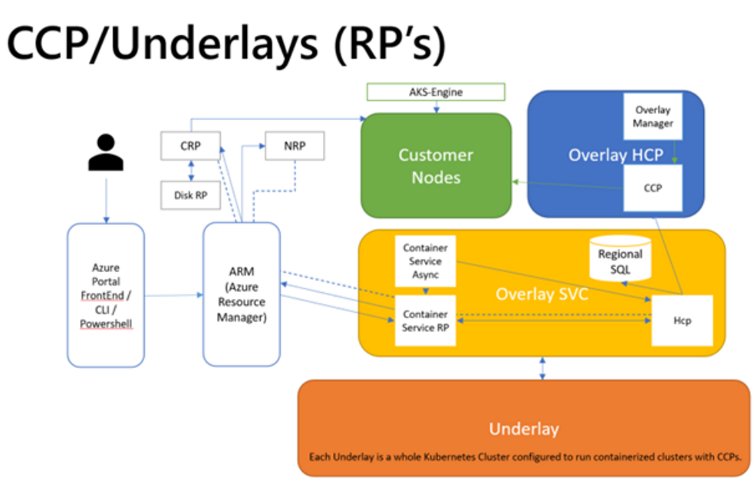
AKS Creates Two Resource Groups
有关 Azure Kubernetes 服务 (AKS) 的常见问题解答 | Azure Docs
Why does AKS create two resource groups?
AKS builds on top of multiple Azure infrastructure resources including VMSS, virtual networks, and managed disks.
Two resource groups per AKS deployment:
First resource group (user-named):
- Contains only the Kubernetes service resource. AKS resource provider automatically creates the second resource group (e.g., MC_myResourceGroup_myAKSCluster_chinaeast2).
Second resource group (node resource group, auto-named):
- Contains all infrastructure resources associated with the cluster: Kubernetes node VMs, virtual networks, and storage
- Default naming: MC_ResourceGroup_AKSCluster_chinaeast2
- Automatically deleted when the cluster is deleted; only use for resources with the same lifecycle as the cluster
Storage
Volumes
Volume types:
- emptyDir
- Empty directory on the host, supports multi-container sharing
-
Temporary space, data permanently deleted when Pod lifecycle ends
-
ConfigMap
- Stores configuration info in plaintext
-
Used by Pods in the same namespace
-
Secret
- Stores sensitive info (passwords, keys, certificates)
- Stored in tmpfs, encrypted
- Deleted after the last Pod using the secret is deleted
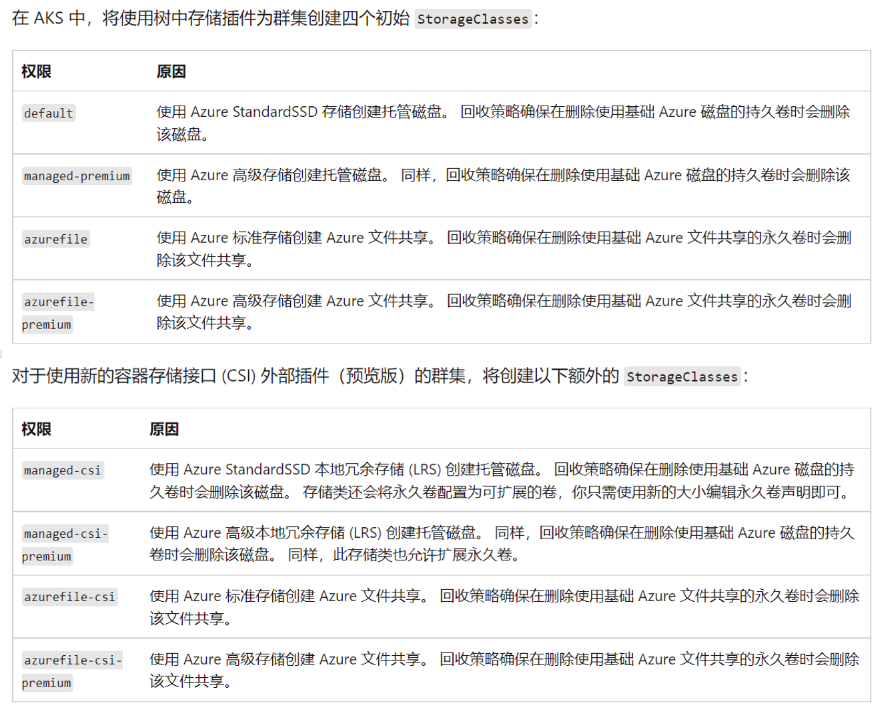
StorageClass
- In K8s, storage class is a PV attribute. PVC matches PV based on storage class.
PV and PVC
-
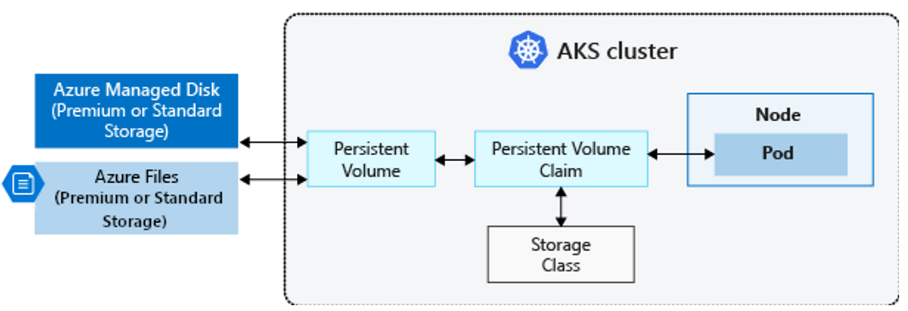
PV (Persistent Volume): Abstraction of shared storage. Typically created by K8s administrators, linked to specific storage technology via plugins.
-
PVC (Persistent Volume Claim): User's storage resource request to the K8s system.
-
PV can be created statically or dynamically:
-
Static creation:
Create disk -> Create PV with disk -> Declare PVC bound to PV -> Declare Pod using PVC -
Dynamic creation:
动态创建 Azure 磁盘卷 | Azure Docs
Declare PVC -> PVC auto-creates corresponding PV and Disk -> Mount in Pod
PVC Notes
- Default storage classes cannot update volume size after creation. Add
allowVolumeExpansion: trueto the storage class, or create a custom storage class. Usekubectl edit scto edit. - PVC size reduction is NOT supported (prevents data loss).
- For disks >=4 TiB, create a storage class with
cachingmode: Nonesince disk caching doesn't support 4 TiB+.
Disk and Fileshare
Overview:
PV can use Azure Managed Disk or Azure File Share.
- Managed disk supports single Pod access only
- File Share supports multiple Pods simultaneously
- Both offer HDD and SSD options
Azure Disk
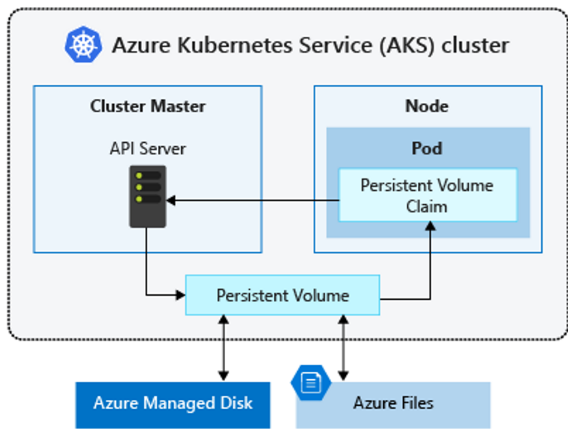
- Azure Disk mounts as ReadWriteOnce, available to a single Pod only. For multi-Pod access, use Azure Files.
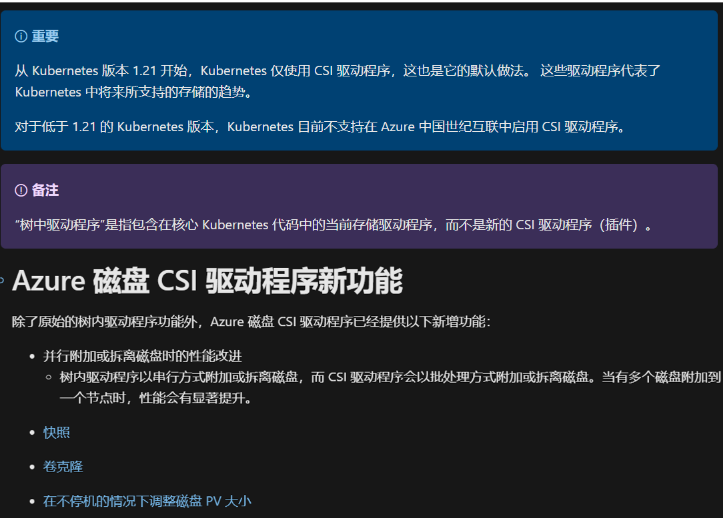
In-tree and CSI Drivers
-
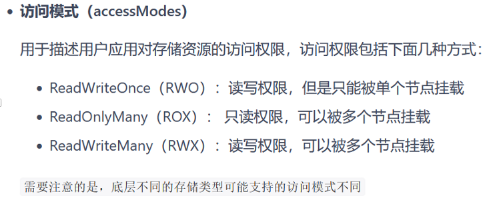
Intree: K8s natively supports some storage PV types, but they live in the K8s repo, tightly coupled. Updates are bound together, developers must follow K8s community rules. CSI solves these problems by decoupling third-party storage code from K8s.
-
CSI: A standard that provides interfaces for storage resources. Backend can use Azure, EMC, etc.
- 在 AKS 中使用 Azure 磁盘的 CSI 驱动程序 | Azure Docs
Create an azurefile-csi-premium StorageClass
-
Azure CLI 2.42+ required. See 安装 Azure CLI.
-
Enable file driver on existing AKS cluster:
az aks update -n myAKSCluster -g myResourceGroup --enable-file-driver
-
See Create an Azure file share. Storage account SKU should be Premium_LRS.
-
See Create a Kubernetes secret for mount usage.
-
Mount as persistent volume. Use
azurefile-csi-premiumas storageClassName (not defaultazurefile-csi). Request file share size should be >=100GB (minimum for premium file shares).
AKS Scaling
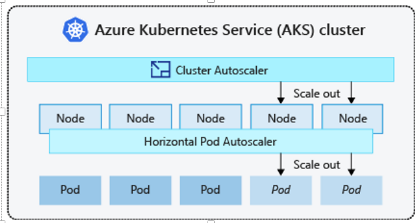
Horizontal Pod Autoscaler
Kubernetes uses HPA (Horizontal Pod Autoscaler) to monitor resource demands and auto-scale replica count. By default, HPA checks the Metrics API every 60 seconds.
Pod count auto-scales based on business load. See upstream K8s docs (AKS makes no changes):
https://kubernetes.io/zh-cn/docs/tasks/run-application/horizontal-pod-autoscale/
Cluster Autoscaler
https://learn.microsoft.com/zh-cn/azure/aks/cluster-autoscaler
Cluster Autoscaler monitors the API every 10 seconds.
-
Scale up: When Pods cannot be scheduled on any node due to resource constraints, a new node is added.
-
Scale down: When unused capacity exists for a period, node count is reduced. Default: CPU/memory usage below 50% and all Pods can be removed triggers scale-down.
-
For node autoscaling time control, see the config map: Using the autoscaler profile
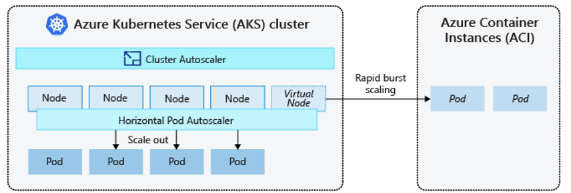
Handling Burst Situations
When applications need rapid scaling, use AKS + Azure Container Instance (ACI) for fast deployment. ACI acts as a virtual node where K8s can run Pods.
Note
Cannot use only ACI -- at least one worker node is required.
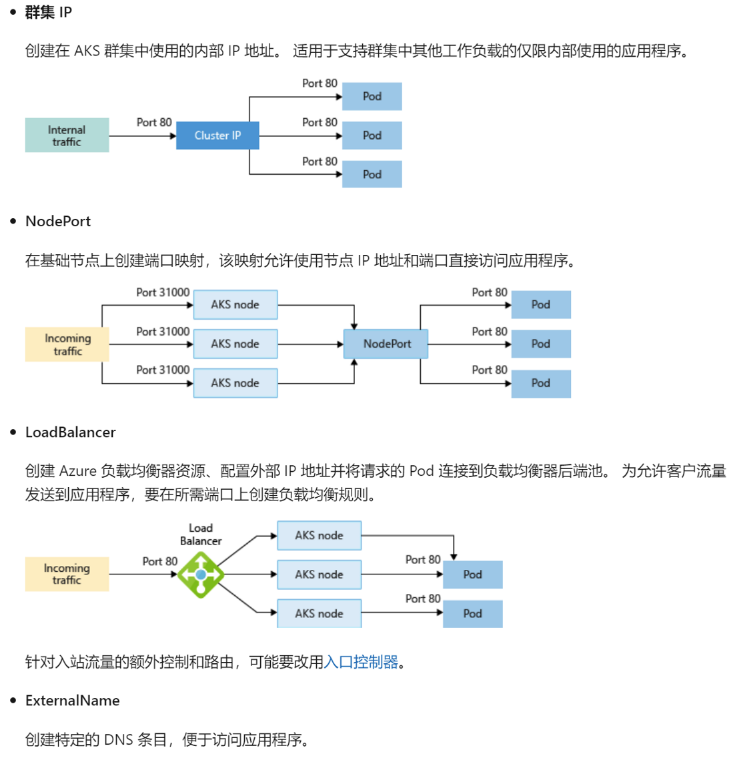
AKS Service
K8s Deprecation of dockershim
Dockerd
dockerd was originally a monolithic engine. Docker is a client-server architecture (client: docker CLI, server: dockerd).
Later, the lower layers were donated to the community, split into three parts:
- containerd: High-level runtime, donated to CNCF. Handles image pull and extraction (not image build/push).
- runC: Low-level runtime, donated to OCI. Implements OCI runtime specification, manages container lifecycle, interacts with Linux.
- dockerd: Still maintained by Docker Inc.
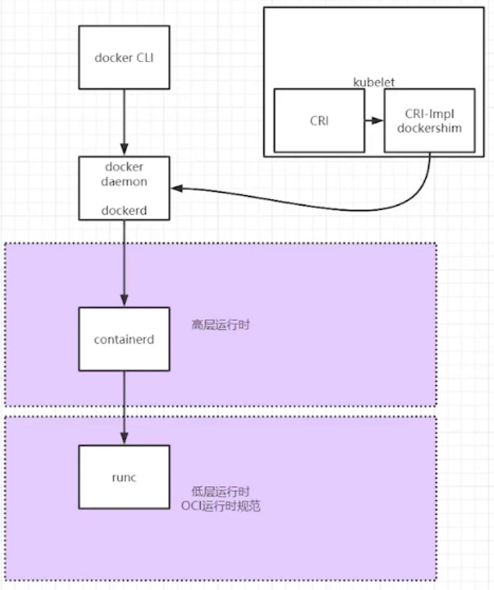
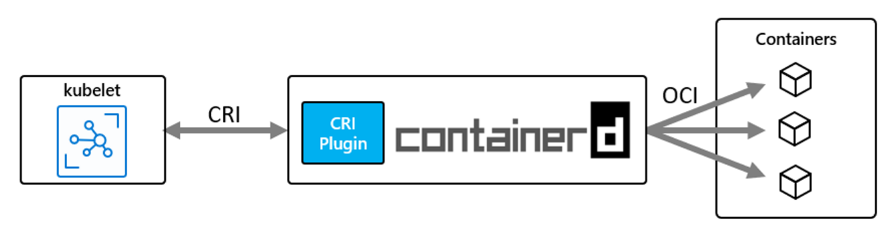
CRI
K8s introduced CRI (Container Runtime Interface) in v1.5. Any runtime implementing CRI can be called by kubelet.
A shim interface layer implements the CRI specification. Kubelet accesses dockerd through the shim, then accesses the container runtime.
- K8s v1.6 built-in dockershim
- dockershim community maintenance stopped, so K8s v1.23 deprecated dockershim
- CNCF integrated the shim into containerd (called CRI plugin). Kubelet's CRI interface accesses containerd directly, bypassing dockerd.
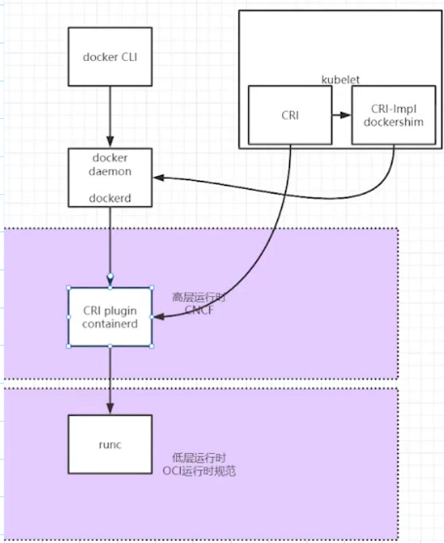
Impact on Usage
No practical impact. Image build/push still uses Docker; image pull still uses containerd. The only difference is it's more lightweight -- shim is integrated into containerd.
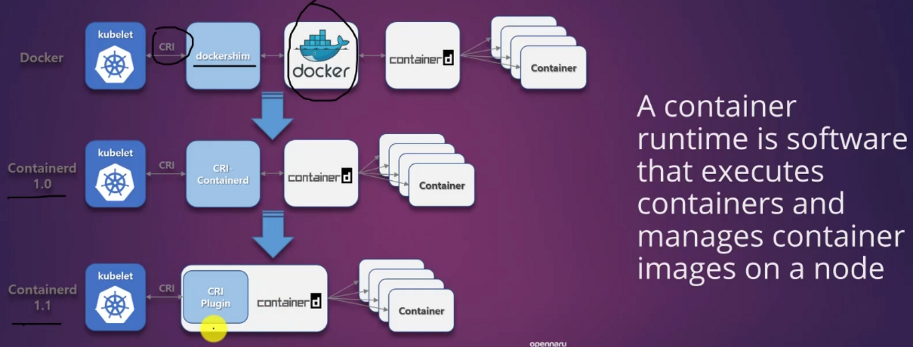
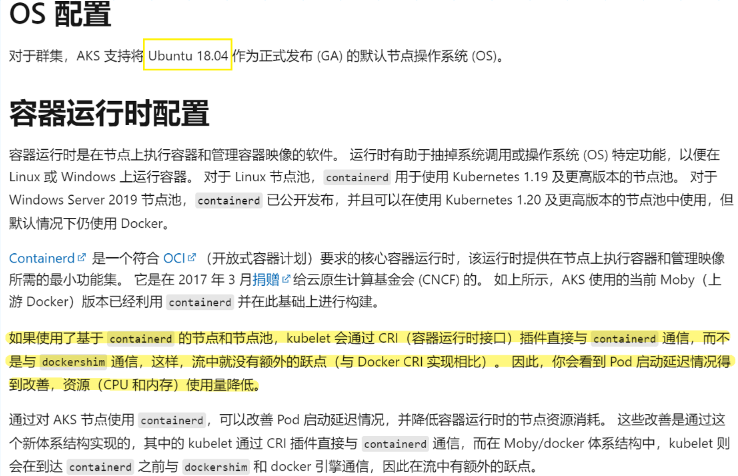
Impact on resource utilization:
Azure Kubernetes 服务 (AKS) 中的群集配置 | Microsoft Docs
AKS Node Operations
Install kubectl
az aks install-cli
#将/usr/local/bin加入环境变量 (Please ensure that /usr/local/bin is in your search PATH, so the `kubectl` command can be found.)
vim /etc/profile
#在末尾加入两行代码:
PATH=$PATH:/usr/local/bin
export PATH
#执行脚本:
source /etc/profile
Delete Nodes
Do NOT Use kubectl delete node
This is a K8s-level operation; K8s level and AKS nodepool level have no API call. Nodepool cannot sense K8s-level changes. After deleting a node with kubectl, nodepool won't reflect the count change. Subsequent scaling will produce errors.
Workarounds if accidentally deleted:
1. Restart the deleted VMSS instance at the nodepool level
2. Upgrade to a higher version
Ephemeral Disks
https://docs.microsoft.com/en-us/azure/virtual-machines/ephemeral-os-disks
https://docs.microsoft.com/en-us/azure/aks/cluster-configuration#ephemeral-os
Best Practice for VM Throttling
Use ephemeral OS disks for improved IO performance and read/write speed, faster reimage, and faster cluster scaling/upgrades. Deployed on ephemeral disk or VM cache. Downside: data lost on restart.
- If the VM size supports ephemeral OS disk, AKS defaults to it; otherwise uses managed disk. Use
--node-osdisk-typewhen creating AKS via CLI. - (PG mentioned: two node pools, one with ephemeral OS disk and one without, workloads may prefer the higher-performing pool)
Node Status
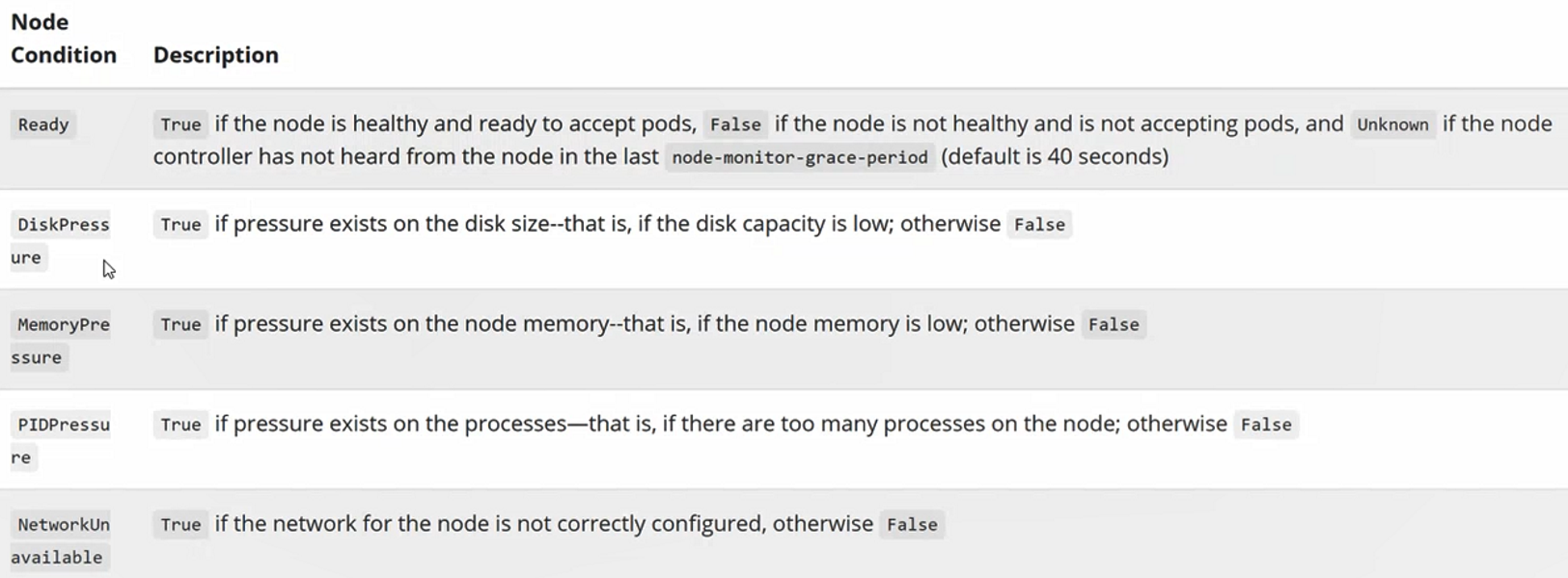
Node Not Ready is mainly caused by these component issues:
- kubelet
- Registers with cluster, reports heartbeat and health status
-
Heartbeat mechanism:
- Small clusters: kubelet reports directly
- Large clusters: creates lease objects, reports status to API server at intervals
-
kubeproxy
-
Also deployed as a pod on the node
-
addons
- Commonly deployed as DaemonSets or Deployments
- omsagent commonly seen in AKS troubleshooting
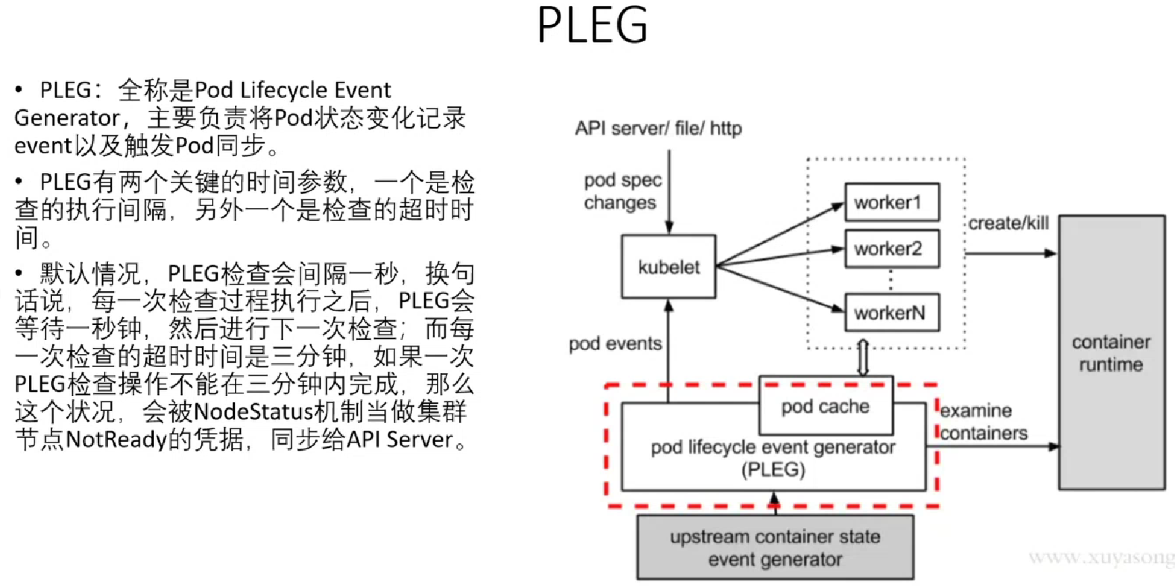
PLEG
Extensions
- Default cluster installs two extensions: 1. custom script (configures environment) 2. billing-related
- SSH Linux extension may exist if customer has SSH'd in; this is fine, both template and instances will be updated
- Do NOT install extensions on VMSS instances; deploy other services through pods
- If other extensions exist, they could be the cause of issues
Login to Node
Method 1: kubectl debug
kubectl get nodes -o wide
kubectl debug node/<node name> -it --image=mcr.azk8s.cn/aks/fundamental/base-ubuntu:v0.0.11
chroot /host
How Privileged Container Works
This command creates a privileged container that mounts the node's root directory / to /host inside the pod via HostPath. Running chroot /host changes the pod's root to /host, exposing the node's filesystem.
Method 2: node-shell
curl -LO https://github.com/kvaps/kubectl-node-shell/raw/master/kubectl-node_shell
chmod a+x kubectl-node_shell
mv ./kubectl-node_shell /usr/local/bin/kubectl-node_shell
Method 3: Direct SSH
- Create a jump box VM in the VMSS VNet
- Install az cli:
Install the Azure CLI on Linux | Microsoft Docs
sudo rpm --import https://packages.microsoft.com/keys/microsoft.asc

echo -e "[azure-cli]
name=Azure CLI
baseurl=https://packages.microsoft.com/yumrepos/azure-cli
enabled=1
gpgcheck=1
gpgkey=https://packages.microsoft.com/keys/microsoft.asc" | sudo tee /etc/yum.repos.d/azure-cli.repo

yum install -y dnf
sudo dnf install azure-cli
- Generate SSH key:
ssh-keygen
- Login az cli:
az cloud set -n AzureChinaCloud
az account set --subscription <name or id>
az login
- Push public key to VMSS template:
az vmss extension set --resource-group MC_aksTest_aksTest_chinaeast2 --vmss-name aks-nodepool2-36202706-vmss --name VMAccessForLinux --publisher Microsoft.OSTCExtensions --version 1.4 --protected-settings "{\"username\":\"azureuser\", \"ssh_key\":\"$(cat /root/.ssh/id_rsa.pub)\"}"
- Update key to every node:
az vmss update-instances --instance-ids '*' --resource-group MC_aadaks_icyaks_chinaeast2 --name aks-nodepool1-27240906-vmss
- SSH with node private IP:
ssh -i id_rsa azureuser@<aks node private IP>
Method 4: kubectl-enter
kubectl-enter
sudo wget https://raw.githubusercontent.com/andyzhangx/demo/master/dev/kubectl-enter
sudo chmod a+x ./kubectl-enter
./kubectl-enter <node-name>
Collect Node Logs
kubectl cp Method
- Create privileged container on management machine:
kubectl get nodes -o wide
kubectl debug node/<node name> -it --image=mcr.azk8s.cn/aks/fundamental/base-ubuntu:v0.0.11
- Enter node, chroot to host:
chroot /host
- Prepare log files (collect, archive, change owner):
cd /tmp/
mkdir logsCollection
journalctl -u kubelet > logsCollection/kubelet.log
date > logsCollection/dateOutput.txt
last > logsCollection/lastOutput.txt
cd /var/log/
cp -r azure/ auth.log\* messages\* syslog\* waagent.log\* /tmp/logsCollection/
ls /tmp/logsCollection/
cd /tmp/
tar zcvf logsCollection.tgz logsCollection/\*
sudo chown azureuser:azureuser logsCollection.tgz
- Keep the privileged container session open. Open a new SSH session to the management machine:
kubectl get pods
kubectl cp <debugger pod name>:host/tmp/logsCollection.tgz ./<destination file name>
- Logs are now transferred from the privileged container to the management machine for upload.
Note
With the official privileged container method, journalctl -u kubelet can only run after chroot /host, not directly inside the node.
sftp Method
Login to node, prepare files, use sftp to transfer to another VM.
- sftp to another VM (need username and password):
- (If logged in via kubectl debug, need
chroot /hostfirst before sftp; if via node-shell, transfer directly)
sftp hangx@52.130.152.117
put <path/file name>
Container Insight
- AKS feature: directly collect node system logs via Container Insight:
Important
This is NOT enabled through AKS Diagnostics. Use the CLI method to enable syslog collection.
- Enable via CLI:

-
View logs:
-
Through workbooks to view syslog
-
Using log query directly:
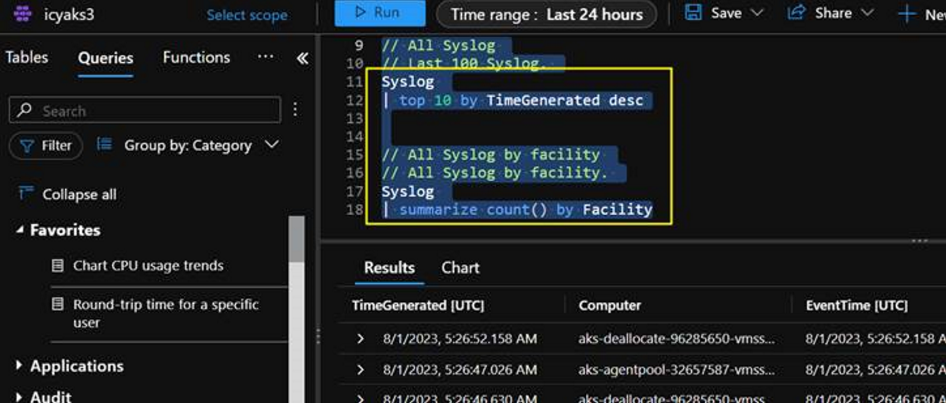
-
This feature deploys an ama pod on nodes to collect node logs and upload to Log Analytics Workspace. It has a high probability of preserving system logs during Node Not Ready events.
Privileged Container
kubectl debug node/aks-nodepool2-36202706-vmss00001a -it --image=mcr.azk8s.cn/aks/fundamental/base-ubuntu:v0.0.11
Name:         node-debugger-aks-nodepool2-36202706-vmss00001a-cfqhw
......
    Mounts:
      /host from host-root (rw)
      /var/run/secrets/kubernetes.io/serviceaccount from kube-api-access-jzvdt (ro)

Volumes:
  host-root:
    Type:          HostPath (bare host directory volume)
    Path:          /
    HostPathType:
......
- Pod mounts host's
/to pod's/hostvia HostPath chroot /hostchanges the pod's root to/host==> exposing the host filesystem
Reconcile
az aks updatewithout optional arguments attempts to restore the cluster to its target state without changing configuration. This is the AKS reconcile.-
Sends a PUT request to the API, comparing all object states (nodes, pods, etc.) against the config file. Modifies object state when current state doesn't match config.
-
Two methods:
az aks update|az aks upgrade(cannot fully replace reconcile). Recommended:az aks update -
The aks-preview Azure CLI extension (version 0.5.66+) supports:
az aks update -g <resourceGroup> -n <clusterName>
without any optional arguments. This recovers a cluster stuck in a failure state.
Remember
Upgrade your az cli to latest version and install aks-preview extension or you will hit errors.
Does Reconcile Cause Restarts?
- How to determine if reconcile causes node restarts?
If latest model is "no", there is a high probability of node reimage. Usually because the VMSS instance and template differ (could also be SKU changes, extensions, etc.)
- If VMSS instance and template match (latest model is "yes") but VMSS template differs from node image (AKS image library with VHDs for each version):
- Validates VMSS template vs node image library. If different, updates VMSS template from node image -> then updates VMSS instances.
- In this case, latest model shows "yes" but reconcile still triggers node reimage.
Best Practice
Do NOT change configurations at the VMSS level. Make changes at the VMSS template level by creating a new pool with the new template, migrating workloads, then deleting the old pool.
AKS Upgrade
Version Differences
- To understand changes between versions (e.g., 1.23.8 vs 1.23.15), check GitHub release notes:
Release note: Releases - Azure/AKS (github.com)
- AKS version format: [major].[minor].[patch]
China region AKS release calendar: Azure Kubernetes 服务中支持的Kubernetes 版本 | Azure Docs
- Known component changes across versions:
1.24.x
Known major changes: kubernetes/CHANGELOG-1.24.md | GitHub
Default serviceaccount no longer includes secret.
1.25+ (including 1.26)
Ubuntu underlying switches from cgroup1 to cgroup2. Java/JDK older versions may see increased memory consumption due to cgroupv2, leading to OOM.
Java/JDK support for cgroups v2 is available in JDK 11 (patch 11.0.16+) or JDK 15+. AKS Kubernetes 1.25+ uses cgroups v2. Migrate workloads to the new JDK.
Support Policy
Support plan categories: N-2 (regular supported) and N-3 (platform support):
Supported Kubernetes versions in AKS | Azure Docs
N-2 vs N-3 comparison: Platform support policy
Info
N-3 platform support is a reduced support level. Plan version upgrades using the N-2 approach.
Upgrade Method
升级 Azure Kubernetes 服务 (AKS) 群集 | Azure Docs
Note
After K8s version upgrade, the buffer node will be deleted. Post-upgrade node names remain the same.
Upgrade Checklist
- Check available upgrade versions:
az aks get-upgrades --resource-group myResourceGroup --name myAKSCluster -o table
- Upgrade the cluster:
az aks upgrade --resource-group myResourceGroup --name myAKSCluster --kubernetes-version KUBERNETES_VERSION
Pre-Upgrade Checks
- If using custom CNI networking, check that remaining IP addresses are sufficient: Plan IP addressing for your cluster
- Check for PDB (Pod Disruption Budget) in the cluster. Delete before upgrade, re-apply after:
kubectl get poddisruptionbudgets <pdb name> -o yaml  > <pdbname>.yaml
kubectl delete pdb <pdb-name>
- For multi-node-pool clusters, upgrade the control plane first, then each node pool individually
- Check overall cluster resource sufficiency:
kubectl top node
If insufficient, scale up first:
az aks scale --resource-group myResourceGroup --name myAKSCluster --node-count <target number>
- N+2 version GA means version N reaches EOS
- Do NOT skip versions: AKS doesn't support cross-version upgrades unless current version is unsupported (then jump to minimum supported version)
- Note container runtime changes: Container runtime configuration
- Verify upgrade success:
az aks show --resource-group myResourceGroup --name myAKSCluster --output table
Auto-Upgrade Channels
https://docs.azure.cn/zh-cn/aks/auto-upgrade-cluster?tabs=azure-cli#cluster-auto-upgrade-channels
| Channel | Action | Example |
|---|---|---|
none |
Disables auto-upgrade, keeps cluster on current K8s version | Default if unchanged |
patch |
Auto-upgrade to latest supported patch version, keeping minor version | If running 1.17.7 with 1.17.9, 1.18.4, 1.18.6, 1.19.1 available, upgrades to 1.17.9 |
stable |
Auto-upgrade to latest supported patch of minor version N-1 (N = latest supported minor) | If running 1.17.7 with 1.17.9, 1.18.4, 1.18.6, 1.19.1 available, upgrades to 1.18.6 |
rapid |
Auto-upgrade to latest supported patch of latest supported minor version | If on N-2 minor version, first upgrades to N-1 latest patch, then to N latest. E.g., from 1.17.7 -> 1.18.6 -> 1.19.1 |
node-image (legacy) |
Auto-upgrade node images to latest available version | Running nodes won't get new images until upgraded. Linux unattended upgrades disabled by default. This channel is deprecated; see NodeImage channel in node image auto-upgrade |
PDB
Disruptions: 干扰(Disruptions) | Kubernetes
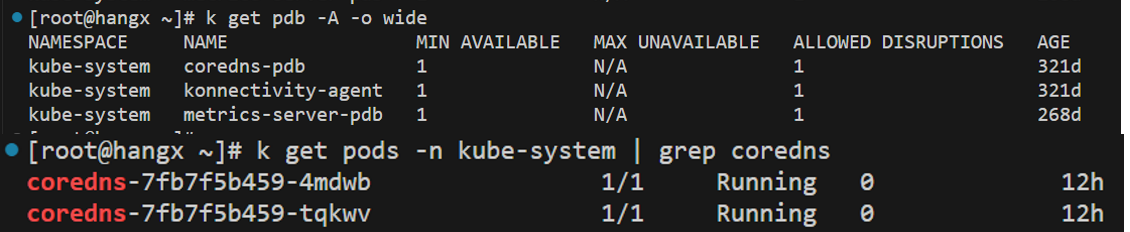
How it's calculated:
- PDB yaml has three fields: selector, minAvailable, and maxUnavailable
- minAvailable and maxUnavailable are configurable; allowedDisruption is system-calculated
- Example: coredns pod minAvailable=1, minimum 1 must be working. Currently 2 pods, so allowed disruption = 1
Certificates
- TLS communication requires certificates. Every cluster component needs CA: api, etcd, kubelet, etc.
- CA (Certificate Authority) - AKS's certificate authority - valid for ~30 years - self-signed - controlled by product group
- Issues certificates to API, kubelet, ETCD, and other components
CA Expiration Impact
Reports x509 errors, kubectl commands fail, all nodes lose contact with API, cluster enters non-success state.
Cert vs SP
- Cert: For inter-component communication
- SP: Represents K8s to acquire resources (compute, networking, storage for scale up, etc.)
AKS Upgrade Auto-Rotates Certs
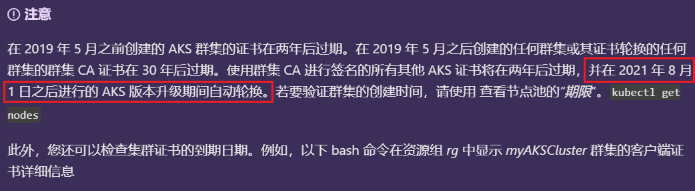
Prerequisite
Must enable TLS Bootstrapping. See Certificate Rotation in AKS | Microsoft Learn
Manual Certificate Rotation
After cert expiration, kubectl commands cannot reach the AKS cluster. Follow manual steps:
https://docs.azure.cn/zh-cn/aks/certificate-rotation#rotate-your-cluster-certificates
Steps:
az aks get-credentialsto login to AKS clusteraz aks rotate-certsto rotate all certificates, CA, and SA- After success, run
az aks get-credentials -g $RESOURCE_GROUP_NAME -n $CLUSTER_NAME --overwrite-existingto update local credentials
Manual Cert Rotation Impact
az aks rotate-certs recreates all nodes, VM scale sets, and their disks. May cause cluster downtime up to 30 minutes.
If combined with version too low, must upgrade first.
- Workaround to avoid full rotate-certs (which rebuilds all nodes):
az extension remove --name aks-preview
az extension add --source https://raw.githubusercontent.com/andyzhangx/demo/master/aks/rotate-tokens/aks_preview-0.5.0-py2.py3-none-any.whl -y RESOURCE_GROUP_NAME=  CLUSTER_NAME=
az aks reconcile-control-plane-certs -g $RESOURCE_GROUP_NAME -n $CLUSTER_NAME
- Updates Master node certificates
- Then scale up the node pool; new nodes will get correct certificates from master
- Gradually delete old nodes; workloads migrate from old to new nodes
Certificate Troubleshooting
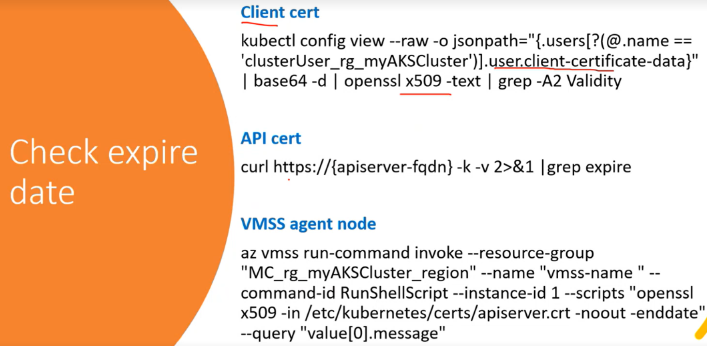
Cert Expiration Impact on Business
- Not necessarily impactful. Certs affect inter-component communication. If business doesn't need inter-component communication, it theoretically won't be affected.
- Even if node shows Not Ready, pods may still run normally. Node status is kubelet periodically reporting to API server; if any step is interrupted, it reports Not Ready.
AKS SP/MI
SP (Service Principal)
使用 Azure Kubernetes 服务 (AKS) 的服务主体 | Microsoft Docs
- AKS clusters accessing other Azure resources (ACR, compute/network/storage for scale up, etc.) need AAD Service Principal.
-
SP is not auto-created; must create manually. SP expires and must be renewed regularly.
-
View:
#查看aks的SP信息
az aks show -g aksTest -n aksTest --query "servicePrincipalProfile"
SP Expiration
After SP expires, operations relying on SP permissions are affected:
- Azure Container Registry - Need permissions to read and pull images
- Networking - Advanced networking with VNet/subnet/public IPs in another resource group
- Storage - Accessing disk resources in another resource group
SP Update
- Create service principal: 使用 AKS 的服务主体 | Microsoft Docs
- Check SP expiration: 为 AKS 群集更新或轮换凭据 | Microsoft Learn
- Reset SP credentials: 为 AKS 群集更新或轮换凭据 | Microsoft Learn
SP Update Causes Node Restart
SP info is written to each VMSS instance (not a referenced variable). Updating SP involves reimage and node restart. Upgrade happens per-node (not simultaneous). Multi-replica workloads with redundancy should not be affected.
- Update cluster with new SP: Update AKS cluster with service principal credentials | Microsoft Learn
MSI (Managed Service Identity)
- MSI in the cluster has two types: cluster identity and kubelet identity:
AKS Review - 2.1: Identity & Access Control | Microsoft Community Hub
#查看aks的kubelet identity信息
az aks show -g aksTest -n aksTest --query "identityProfile"
#查看aks的cluster identity信息
az aks show -g aksTest -n aksTest --query "identity"
- Migrate from SP to MSI: 在 AKS 中使用托管标识 | Microsoft Learn
SP to MSI Migration Details
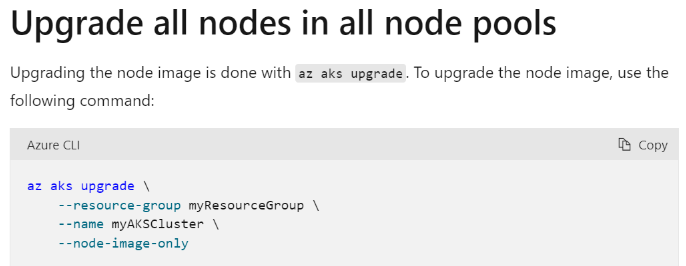
After upgrade, control plane and addons use managed identity, but nodepool kubelet still uses SP until a newer node image appears in the image library. Node image update: Upgrade AKS node images | Microsoft Learn
AKS Networking
AKS Network Planning
- AKS deployment limits (code-specified upper limits):
| Metric | Limit |
|---|---|
| Maximum nodes per cluster with VMSS and Standard Load Balancer SKU | 1000 (across all node pools) |
| Maximum node pools per cluster | 100 |
| Maximum pods per node: Basic networking (Kubenet) | Maximum: 250, Azure CLI default: 110, ARM template default: 110, Portal default: 30 |
| Maximum pods per node: Advanced networking (Azure CNI) | Maximum: 250, Default: 30 |
-
Network constraints:
-
Kube-proxy is based on iptables for service discovery and load balancing. As nodes, services, and pods increase, kube-proxy updates become a bottleneck (kube-proxy continuously watches API and refreshes changes).
-
SNAT Port Issue:
- Kubenet: Both internal and external communication needs NAT; source IP shows as node primary IP
- CNI: Internal communication doesn't need NAT; traffic leaving the VNet still needs NAT
-
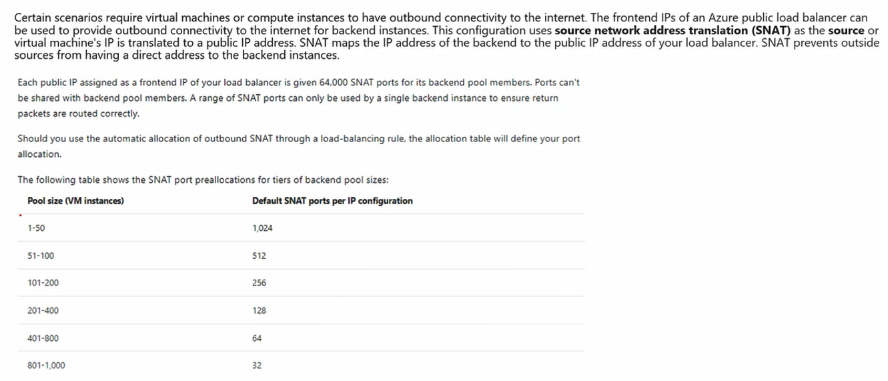
One public IP provides 6400 SNAT ports. Default: when nodes < 50, each node gets 1024 ports.
-
By default, SLB has one public IP binding. Users can specify multiple public IPs.
Scale the number of managed outbound public IPs
- Add multiple IPs and modify per-node SNAT port count to customize large clusters.
Provide your own outbound public IPs or prefixes
-
If SNAT exhaustion is confirmed, add IPs to SLB. One SLB supports up to 600 public IPs; one SLB IP provides 64000 ports.
-
NAT Gateway: Max 16 IPs, up to 64000 x 16 ports.
https://docs.microsoft.com/en-us/azure/aks/nat-gateway
- Pods use private IPs. Exposing pods/services externally via public IP uses SNAT. Per-node port count depends on pod count:
Azure Linux
Azure Linux Container Host for AKS is now available, optimized for running container workloads on AKS. Maintained by Microsoft, based on Microsoft Azure Linux (open-source Linux distribution).
Options:
- Create new AKS cluster with Azure Linux Container Host
- Add Azure Linux Container Host node pool to existing AKS cluster: Add an Azure Linux node pool
- Migrate existing AKS cluster to Azure Linux Container Host: Azure Linux migration
AKS-AAD
Differences between AKS-managed Azure AD, Azure RBAC for Kubernetes authorization, and Kubernetes RBAC with Azure AD integration:
AKS-managed Azure AD integration focuses on how AKS integrates with AAD. Compared to legacy AAD integration, it simplifies integration steps. Purpose: users can authenticate via AAD to connect to AKS clusters.
- Users with Azure Kubernetes Service Cluster Admin Role: After
az aks get-credentials, kubeconfig gets K8s cluster clusterAdmin role permissions. - Users with Azure Kubernetes Service Cluster User Role: After
az aks get-credentials, kubeconfig is still empty. Admin must assign K8s RBAC role within the cluster. - Without AAD integration, Cluster User Role has the same effect as Cluster Admin Role (all users login as clusterAdmin).
Kubernetes RBAC with Azure AD integration: K8s native access control. Role definitions and bindings apply only to cluster-internal resources. On AAD-integrated AKS:
- Azure level: Grant user Azure Kubernetes Service Cluster User Role to connect to cluster
- Cluster level: Control access via RoleBindings and ClusterRoleBindings
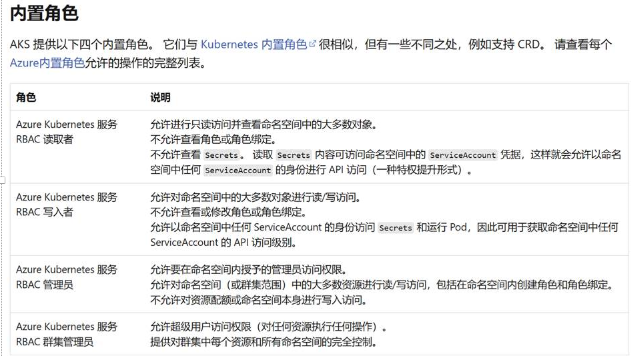
Azure RBAC for Kubernetes authorization: On AKS with managed AAD and Azure RBAC enabled, Azure-level role assignments automatically map to cluster-internal access permissions. Admins only need to assign Azure-level roles. Built-in roles: 概念 - AKS 中的访问和标识 | Azure Docs
AKS Planned Maintenance
使用计划内维护来计划和控制 AKS 群集的升级 | Microsoft Learn
Add new maintenance configuration:
az aks maintenanceconfiguration add -g myResourceGroup --cluster-name myAKSCluster -n aksManagedAutoUpgradeSchedule --schedule-type Weekly --day-of-week Friday --interval-weeks 3 --duration 8 --utc-offset +05:30 --start-time 00:00
Update existing configuration:
az aks maintenanceconfiguration update -g myResourceGroup --cluster-name myAKSCluster --name default --weekday Monday --start-hour 2
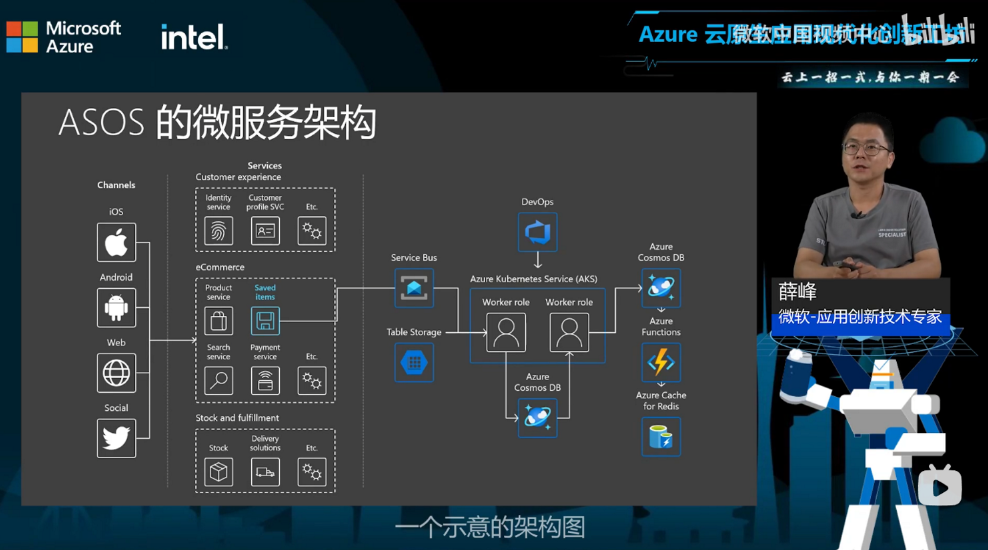
AKS Microservices Architecture Example