Azure Networking
Related Notes
Network Connectivity Testing Commands
psping
TCP connection, test if port is open: PsPing - Sysinternals | Microsoft Learn
psping <target-ip>:443
psping <target-ip>:9443
telnet
telnet 168.63.129.16 80
nc
Test TCP connection:
nc -vz mcr.azk8s.cn 443
dig
dig (Domain Information Groper) is a flexible tool for interrogating DNS domain name servers. It performs DNS lookups and displays answers from queried name servers.
dig mcr.azk8s.cn
dig queries DNS records; it does not test an HTTPS service port. Use nc -vz mcr.azk8s.cn 443 for that check.
Dig usage:
@to specify the name server-tto specify the record type to resolveAis the record type: resolves domain name to IP
dig -t A svc-sts-nginx.default.svc.cluster.local @10.0.0.10
curl
- Test external network connectivity. Without parameters, curl sends a GET request.
curl myip.ipip.net(only proves outbound internet access works)

curl ipconfig.me: also shows your public IP
siege
- Generates sustained access requests, used for load testing.
siege -c 15 -t 20m https://fibonnodeis.chinacloudsites.cn
tcpdump
Network packet capture, on Linux we typically use tcpdump:
tcpdump -i any host <Pod-IP> -C 10 -W 10 -w 31983.pcap
#<Pod-IP> 需修改为Pod的IP地址,作为过滤条件。
#-C是每个文件大小的上限,以M为单位。
#-W是最多写入多少个抓包文件,编号从0开始,到9写满后,从0号文件开始循环写。
#也就是说上述指令在抓包时最多会占用大约10 *10 = 100M的磁盘空间,您可以根据实际情况进行配置
#考虑到网络包通常都很大,所以我们应该需要设置一个监控脚本来监控应用日志,如果发现应用日志有相关报错,我们可以kill掉tcpdump的收集进程
Windows Network Capture
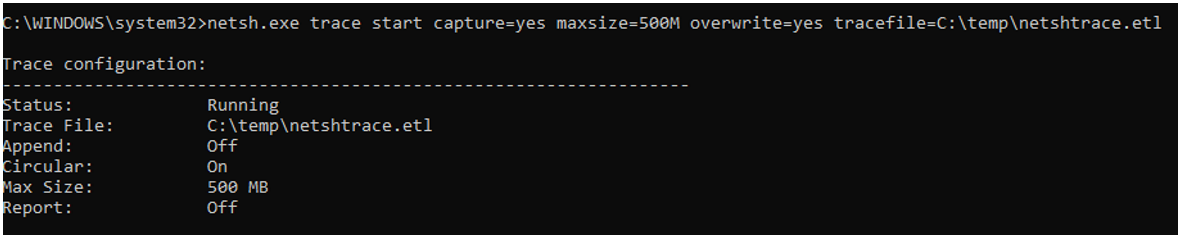
- Run as admin in cmd,
C:\temp\netshtrace.etlis the output path:
netsh.exe trace start capture=yes maxsize=500M overwrite=yes tracefile=C:\temp\netshtrace.etl
-
Reproduce the issue
-
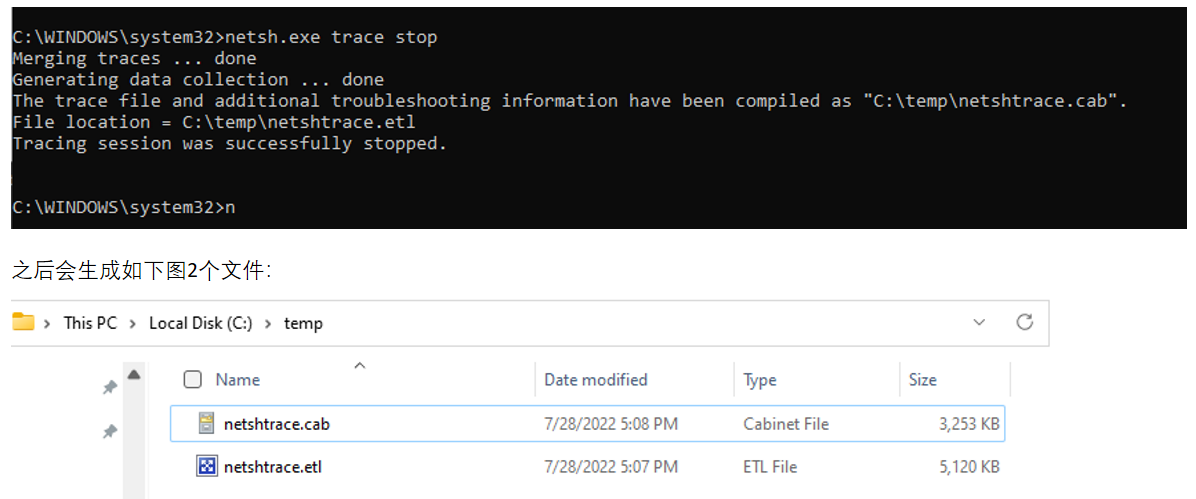
Stop capture:
netsh.exe trace stop
VNET
- VNet allows many types of Azure resources (e.g., Azure VMs) to securely communicate with each other, the Internet, and on-premises networks.
From https://docs.azure.cn/zh-cn/virtual-network/virtual-networks-overview
- A virtual network is communication between devices, servers, and virtual machines over the Internet. Azure Virtual Network (VNet) is a private network with interconnected Azure resources such as Azure VMs, infrastructure, and networking. It supports communication between various Azure resources over the Internet. In a virtual network, contiguous IP address blocks are used to create multiple subnet networks. From https://k21academy.com/microsoft-azure/az-303/azure-networking/
VNet Outbound Without Public IP
Internet access requires an outbound method such as a NAT gateway, a load balancer outbound rule, or a public IP. Some existing nonprivate subnets still provide default outbound access, but new VNet subnets created with API versions released after March 31, 2026 are private by default. Inbound access needs its own configured path. See Default outbound access.
Public IP and Private IP
- Private -- Private IP addresses allow communication between resources within an Azure resource group. Resources cannot access the private IP from outside the network. Resources that can connect using private addresses include VM network interfaces, ILB (internal load balancers), and application gateways.
- Public -- Public IP addresses allow Azure resources to communicate with public-facing Azure services over the Internet. Resources that can connect using public addresses include VM network interfaces, public-facing ILB, application gateways, VPN gateways, and Azure Firewall.
From https://k21academy.com/microsoft-azure/az-303/azure-networking/
Subnet
- A subnet is a portion of a network covering a range of IP addresses. In Azure, a VNet can be divided into smaller subnets. When creating a VNet in Azure, you need to specify the subnet range and topology. The IP address range in a subnet will be a sub-portion of the larger block of IP addresses used in the VNet. VMs and resources in the network will be assigned IP addresses from these subnets.
Azure Reserved IPs
Azure reserves the first four IPs and the last IP in each subnet for its own use.
From https://k21academy.com/microsoft-azure/az-303/azure-networking/
NSG
- A Network Security Group acts as a firewall at the network level. It filters traffic passing through Azure resources in a virtual network. NSG is a set of security rules that define priority, source/destination, protocol, direction, port range, and action. Using these rules, NSG allows or denies inbound and outbound traffic.
From https://k21academy.com/microsoft-azure/az-303/azure-networking/
Gateway
-
A gateway is essentially the IP address through which one network accesses other networks.
-
For example, with Network A (IP range
192.168.1.1~192.168.1.254, subnet mask255.255.255.0) and Network B (IP range192.168.2.1~192.168.2.254, subnet mask255.255.255.0), without a router, TCP/IP communication between the two networks is impossible, even if connected to the same switch/hub. TCP/IP protocol uses the subnet mask to determine hosts are on different networks. -
To enable communication between these networks, a gateway is required. If a host in Network A finds the destination is not on the local network, it forwards the packet to its own gateway, which forwards to Network B's gateway, which then delivers to the destination host.
-
So, only by setting the gateway IP address correctly can TCP/IP enable inter-network communication.
-
The gateway IP address belongs to a device with routing capability: a router, a server with routing protocol enabled, or a proxy server.
Azure Relay
什么是 Azure 中继? - Azure Relay | Azure Docs
Private and Service Endpoint
Azure Private Endpoints and Service Endpoints can both be used to enhance security and control network access. Key differences:
-
Definition and Scope: Private Endpoints target individual Azure resources (e.g., VMs, storage accounts), while Service Endpoints target service identifiers (e.g., Azure Storage, Azure SQL Database).
-
Network Path: Private Endpoints create a private IP address in the VNet, connecting Azure resources directly to a subnet. Resources can be accessed via the VNet's private IP without going through the public Internet. Service Endpoints connect through the Azure resource's virtual network service endpoint to the service identifier.
-
Security: Private Endpoints improve security by restricting traffic to the Azure resource's private IP address. Service Endpoints improve security by restricting traffic to the specific service's IP address range.
Private Endpoint DNS Resolution
When a storage account has a private endpoint configured, DNS resolution from within the subnet first resolves the public endpoint (e.g., artifactorysa.file.core.chinacloudapi.cn) via CNAME to the private endpoint (e.g., artifactorysa.privatelink.file.core.chinacloudapi.cn), which then resolves to the private IP.
Your local DNS needs to forward the public endpoint to Azure DNS for resolution, or you can directly configure the public endpoint to the private IP in /etc/hosts.
Load Balancer
-
Load Balancer works at the transport layer
-
Methods to access VMSS:
-
Assign each VM its own public IP (expensive)
-
Use Load Balancer with NAT:
- Assign public IP to LB, LB routes traffic through each VM's port to individual VM instances
- By default, NAT rules are added to LB, forwarding remote connection traffic to each VM on given ports
VM Internal Network Access Options
Security Risk
Assigning public IPs to multiple VMs risks port scanning and brute force attacks.
- Option 1:
-
Deploy many VMs in a VNet, but only one jump box VM has a public IP. Connect to other VMs through this jump box VM's NIC to reach other VMs' NICs.
-
Option 2:
-
Set up gateways on both the corporate network and the VNet, connect to VMs via VPN.
-
Option 3:
- Purchase a dedicated line (ExpressRoute) for direct private access from on-premises to the datacenter.