Azure DevOps Basics
Related Notes
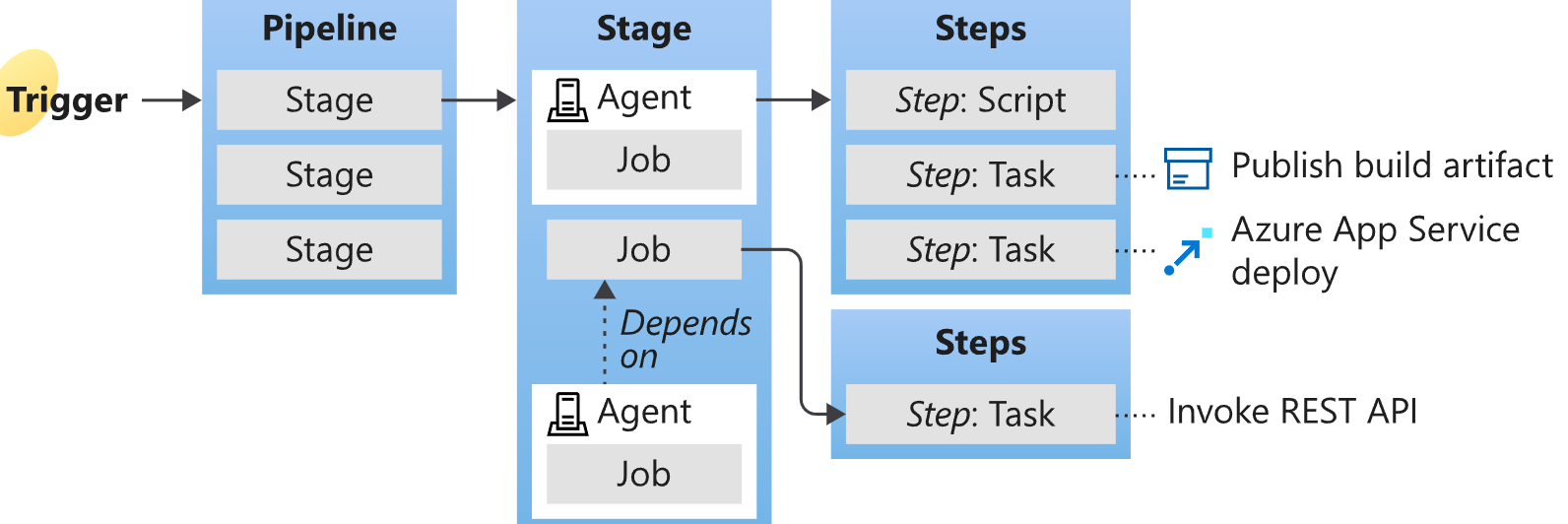
Trigger
- You can configure a pipeline to run upon a push to a repository, at scheduled times, or upon the completion of another build.
Pipeline
https://learn.microsoft.com/en-us/azure/devops/pipelines/customize-pipeline?view=azure-devops#understand-the-azure-pipelinesyml-file
- A pipeline defines the continuous integration and deployment process for your app. It's made up of one or more stages. It can be thought of as a workflow that defines how your test, build, and deployment steps are run.
- 在repo的根目录下一般会有==azure-pipelines.yml==,一般会定义如下内容:
- 什么情况下触发trigger
- pipeline在什么agent pool下运行
- 每一个steps做什么(运行scripts或者tasks)
- pipeline分两种:
- YAML pipeline -- 常用
- classic pipeline
Stage
- a logical boundary in the pipeline.
- mark separation of concerns (for example, Build, QA, and production)(有先后顺序的依赖)
- 一个stage包含多个job
Job
- 一个 Job 包含多个 Step;同一个 Job 的所有 Step 在同一个 Agent 上运行。
- 常用于需要同时在多个环境中并行运行时:For example, you might want to build two configurations - x86 and x64. In this case, you have one stage and two jobs. One job would be for x86 and the other job would be for x64.
Steps
- 是一个pipeline中最小的执行单元,一个step中可以执行一个task或者一个script
- 每个 Step 在独立进程中运行,进程环境变量不会自动传递给下一个 Step。
- Step 可以通过 logging command 设置 Pipeline 变量,供后续 Step 使用。
Task
- 是azure devops中预先定义好的schema,填入相关参数,组成一个task
https://learn.microsoft.com/en-us/azure/devops/pipelines/tasks/reference/?view=azure-pipelines&viewFallbackFrom=azure-devops
Script
- 是用户自定义的command
Working Directory
system variables: https://learn.microsoft.com/en-us/azure/devops/pipelines/build/variables?view=azure-devops&tabs=yaml#system-variables
agent directory structure: https://learn.microsoft.com/en-us/azure/devops/pipelines/agents/agents?view=azure-devops&tabs=yaml%2Cbrowser#agent-directory-structure
用的是$(System.DefaultWorkingDirectory),详细定义见上面文档。
Run
- run是pipeline的一次运行。每次Run,将job发给agent去运行
Approval
- define a set of validations required before a deployment runs. Manual approval is a common check performed to control deployments to production environments.
- When checks are configured on an environment, a pipeline run pauses until all the checks are completed successfully.
Artifact
- An artifact is a collection of files or packages published by a run.
Agent
- 一个 Agent 同时运行一个 Job;并行运行多个 Job 需要多个可用 Agent 和并行作业容量。
Pipeline Runs
Process
For each run, Azure Pipelines:
- Processes the pipeline.
- Requests one or more agents to run jobs.
- Hands off jobs to agents and collects the results.
For each job, an agent:
- Prepares for the job.
- Runs each step in the job.
- Reports results.
Timeouts
Info
- 每个job有timeout超时时间,未能完成就会被server cancel掉。这时就会进入到cancel timeout时间,在这个时间内,agent没能cancel完成,server直接标记job为失败。
- agent每分钟向server报告一次心跳,五次心跳没接收到,server就认为agent下线,其上的job标记为失败。
Reference
Jobs
YAML 格式
https://learn.microsoft.com/en-us/azure/devops/pipelines/process/phases?view=azure-devops&tabs=yaml#define-a-single-job
- pipeline中的job不支持priority,而是通过==condition==和==dependency==来实现
Stages
https://learn.microsoft.com/en-us/azure/devops/pipelines/process/stages?view=azure-devops&tabs=yaml
Tasks and Scripts
https://learn.microsoft.com/en-us/azure/devops/pipelines/tasks/reference/?view=azure-pipelines&viewFallbackFrom=azure-devops
Templates
https://learn.microsoft.com/en-us/azure/devops/pipelines/process/templates?view=azure-devops&pivots=templates-includes
Variables
https://learn.microsoft.com/en-us/azure/devops/pipelines/process/variables?view=azure-devops&tabs=yaml%2Cbatch
Resources
https://learn.microsoft.com/en-us/azure/devops/pipelines/process/about-resources?view=azure-devops&tabs=yaml
Security
- https://learn.microsoft.com/en-us/azure/devops/organizations/security/about-permissions?view=azure-devops&tabs=preview-page
- https://learn.microsoft.com/en-us/azure/devops/pipelines/library/add-resource-protection?view=azure-devops
- https://learn.microsoft.com/en-us/azure/devops/organizations/security/add-users-team-project?view=azure-devops&tabs=preview-page
- https://learn.microsoft.com/en-us/azure/devops/pipelines/security/overview?view=azure-devops
Important
ado中,下列资源属于==protected resources==,每项资源都可以单独被管理,需要user账户被加到Admin Group中:
- Agent pools
- Secret variables in variable groups
- Secure files
- Service connections
- Environments
- Repositories
- ado中的user可被分配到security group中,从group层面会对ado中的各项功能做授权。
Service Connection
作用是在pipeline中连接到azure cloud中。是azure devops project级别的资源,在project setting中添加。
https://learn.microsoft.com/en-us/azure/devops/pipelines/library/service-endpoints?view=azure-devops
连接方式
https://learn.microsoft.com/en-us/azure/devops/pipelines/library/connect-to-azure?view=azure-devops#create-an-azure-resource-manager-app-registration-with-workload-identity-federation-automatic
ado中提供了如下几种连接方式:
- App registration (automatic):只适用于azure global,因为需要在UI界面直接选择订阅。而Azure China的sub他是识别不了的。
- managed identity:同上
- App registration or managed identity (manual): 可以支持自定义Cloud type,可以设成AzureChinaCLoud
认证方式
app registration/managed identity方式都支持两种认证方式:
- workload identity: 是推荐的方式,需要在service principal或者managed identity上创建federated secret,让entraID信任devops颁发的token。在相应的scope上授予权限,devops就能用这个身份创建资源。
- secret: 不推荐,因为client secret需要手动rotation。
Warning
现在我们采用的是service principal+federated secert方式,目前存在一个bug就是service principal - federated secert设置中需要手动把Audience的值从api://AzureADTokenExchangeChina(默认值)改成api://AzureADTokenExchange。否则devops会找不到service principal
与Azure Support沟通后,他们表示这种修改是非标操作,建议更换为workload identity方式。
测试下来workload identity同样可以实现同样的功能,并且在创建federated secret时默认值就是api://AzureADTokenExchange并不需要再改。
Managed Identity + Workload Identity
先在devops UI界面添加service connection中获取到issuer和subject identifier。然后可以用下面terraform代码创建uai+federated secert。
然后去devops UI界面verify and save,完成service connection的创建。
resource "azurerm_user_assigned_identity" "uai" {
  name                = var.uai_name
  location            = var.location
  resource_group_name = var.test-rg.name

  lifecycle {
    ignore_changes = [tags]
  }
}

resource "azurerm_role_assignment" "test-assign" {
  depends_on           = [azurerm_user_assigned_identity.uai]
  scope                = var.test-rg.id
  role_definition_name = "Contributor"
  principal_id         = azurerm_user_assigned_identity.uai.principal_id
  timeouts {
    create = "20m"
  }
}

resource "azurerm_federated_identity_credential" "example" {
  name                = "ado-service-connection"
  resource_group_name = var.test-rg.name
  audience            = ["api://AzureADTokenExchange"]
  issuer              = ""
  parent_id           = azurerm_user_assigned_identity.uai.id
  subject             = ""
}
Lab
- https://www.youtube.com/watch?v=zZWJocpYZxA&list=PLpbcUe4chE79sB7Jg7B4z3HytqUUEwcNE&index=75
- https://github.com/prometheus-operator/prometheus-operator