Azure Container Registry & Azure Container Instances
Related Notes
ACR
托管容器注册表 - Azure Container Registry | Azure Docs
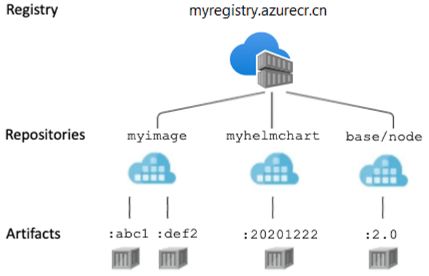
层级概念
关于注册表、存储库、映像和项目 - Azure Container Registry | Azure Docs
- 容器注册表
支持的内容格式 - Azure Container Registry | Azure Docs
-
存储库:按名称组织镜像和制品。同一存储库可包含不同 tag 或 digest;namespace 是存储库名称的一部分。参见注册表概念。
-
容器镜像
层:注册表中的项目共享公用的层,因而提高了存储效率。
清单
-
推送到ACR的每个image都与一个清单关联,推送的时候由注册表生成清单唯一标识image。
-
列出存储库的清单:
az acr manifest list-metadata --name azure-vote-front --registry xhacrtest
清单摘要 digest
- 清单由唯一的 SHA-256 哈希(即==清单摘要==)进行标识 。 每个映像或项目(无论是否标记)均由其摘要标识。 即便项目的层数据与其他项目的层数据相同,摘要值也是唯一的。 此机制使你能够反复向注册表推送标记相同的映像。 例如,你可反复向注册表推送 myimage:latest 而不出任何错误,因为每个映像均由其唯一摘要标识。
项目寻址
关于注册表、存储库、映像和项目 - Azure Container Registry | Azure Docs
- 使用完整的登录服务器名称,例如
myregistry.azurecr.cn。
ACR SKU
注册表服务层级和功能 - Azure Container Registry | Azure Docs
推送镜像到 ACR
快速入门 - 创建注册表 - Azure CLI - Azure Container Registry | Azure Docs
-
将映像推送到注册表之前,必须使用 ACR 登录服务器的完全限定的名称进行标记。 登录服务器名称采用 \
.azurecr.cn (全小写)格式,例如 mycontainerregistry007.azurecr.cn。 -
使用 docker tag 命令标记映像。 使用 ACR 实例的登录服务器名称替换 \
镜像异地复制与区域冗余
教程 - 创建异地复制注册表 - Azure Container Registry | Azure Docs
Important
需要==Premium==的SKU
ACR 任务
在Azure中生成docker镜像,推送至Registry
-
快速任务:az acr build使用docker build;发送到ACR任务。
-
自动触发的任务
- 提交代码时生成
- 更新base image时生成
-
定时运行
-
多步骤任务
日志查看:az acr task logs
ACR MI
在 ACR 任务中启用 Azure 资源的托管标识,使该任务无需提供或管理凭据即可访问其他 Azure 资源。 例如,使用托管标识可让某个任务步骤将容器映像提取或推送到其他注册表。
ACR 登录
To authenticate with an Azure Container Registry, you can use the az acr login command with the name of the registry:
#This command will authenticate your Docker CLI with the Azure Container Registry and allow you to push and pull images
az acr login --name myregistry
#Alternatively, you can use the docker login command with the fully qualified name of the registry, This command will prompt you for your Azure Container Registry username and password, which you can find in the Azure portal under "Access keys" in the container registry's settings.
docker login myregistry.azurecr.cn
#After authenticating, you can use the Docker CLI to push and pull images to and from the Azure Container Registry.
ACR 镜像清理
清除标记和清单- Azure Container Registry | Azure Docs
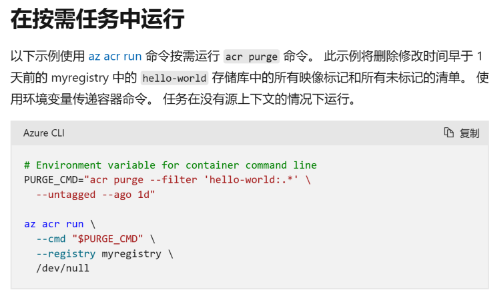
--filter是必需的选项,如果您需要对所有repository进行清理,请使用类似如下方式。
PURGE_CMD="acr purge --filter '*:.*' --untagged --ago 180d --dry-run"
Warning
由于删除的image无法恢复,请在删除前使用--dry-run参数来查看可能被删除的数据。
Troubleshooting
注册表登录故障排除 - Azure Container Registry | Azure Docs
Can't pull images from Azure Container Registry to Kubernetes - Azure | Microsoft Learn
az acr check-health #测试ACR健康情况
az aks check-acr --name <aks name> --resource-group <aks rg> --acr <acr name> #查看AKS与ACR连接性
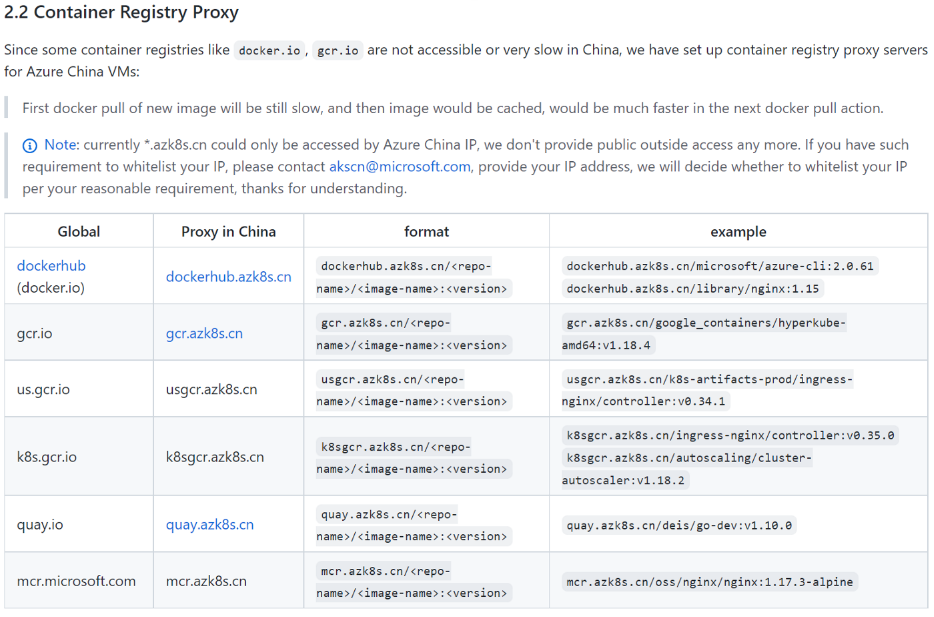
Azure China 注册表端点
-
不过由于docker.io的镜像仓库,其IP所在的地理位置位于海外,在整个网络链路上涉及到的节点比较多,确实会存在网络拥塞导致的拉取镜像慢或是失败的情况。
-
您可以考虑使用Azure China的container registry proxy,其部署在Azure中国数据中心内部,可以实现镜像的缓存,进而实现更加稳定快速的镜像拉取,详情请见: container-service-for-azure-china/README.md at master · Azure/container-service-for-azure-china · GitHub
ACI
- 不管什么方案(包括简单应用程序、任务自动化、生成作业),只要能够在隔离容器中操作,就可以使用 Azure 容器实例这种解决方案。
-
底层也是跑在VM上,创建的时候可以选择CPU、内存的大小。
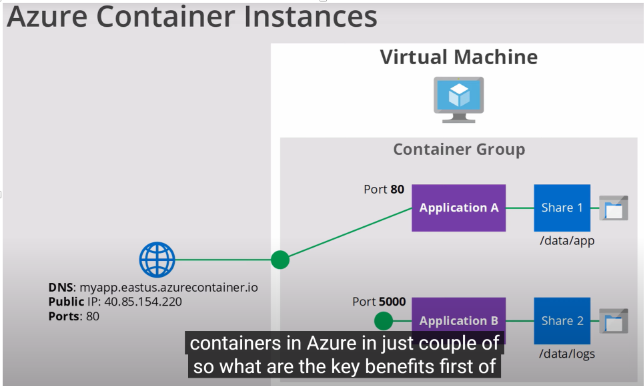
持久存储
-
默认情况,容器是无状态的,崩溃重启等,会造成数据丢失。
-
可以将file share挂载到instance上:将 Azure 文件卷装载到容器组 - Azure Container Instances | Azure Docs
-
可以用azcli或者yaml文件来部署容器并挂载
容器组
- 容器组中的容器共享生命周期、资源、本地网络和存储卷;与POD概念类似。
教程 - 部署多容器组 - YAML - Azure Container Instances | Azure Docs
- 用yaml文件+azcli部署