Command Line Tools
Azure command-line tools for managing resources and data
Covers Azure PowerShell, Az CLI, and AzCopy for managing Azure Storage and other Azure resources.
Azure PowerShell
介绍
- PowerShell 是跨平台自动化任务解决方案,作为脚本语言,用于自动化系统管理;还用于自动化部署、测试解决方案;输入输出均为 .NET 对象
- Azure PowerShell 是一组 cmdlet(轻量级命令),用于直接从 PowerShell 管理 Azure 资源
安装
- Introducing the Azure Az PowerShell module | Microsoft Docs
- Install the Azure Az PowerShell module | Microsoft Learn
通过 PowerShellGet 安装 Azure PowerShell
要求:
- Windows PowerShell 5.1 or more
- .NET Framework 4.7.2 or more
- 要先安装最新版本的 PowerShellGet
- 安装 PowerShellGet:
Install-Module -Name PowerShellGet -Force
- 从 Windows PowerShell 上安装:
Install-Module -Name Az -Scope AllUsers -Repository PSGallery -Force
登录
- 对于 Azure China Cloud,使用:
Connect-AzAccount -Environment AzureChinaCloud
便捷登录 Tips
使用 AAD App 自动登录
- 建一个 AAD 的 app,new 一个 client secret
- 在 PowerShell 里面写一个登录脚本,做一个 credential,用这个 app 的 client secret 来登录

AzPowerShell 清除缓存
清除缓存
msal.cache 里面存了 token,清缓存可以手动删除以下文件:
Remove all of these files:
C:\Users\<yourname>\.azure\AzureRmContext.jsonC:\Users\<yourname>\.azure\AzureRmContextSettings.jsonC:\Users\<yourname>\.azure\AzureRmSurvey.jsonC:\Users\<yourname>\.azure\keystore.cacheC:\Users\<yourname>\AppData\Local\.IdentityService\msal.cache
Az CLI
- Tool for managing Azure resources, text-based, designed for efficiency.
- CLI 是基于 Python 的。
安装
-
Install in Windows: 安装适用于 Windows 的 Azure CLI | Azure Docs
-
Install in Linux: Install the Azure CLI on Linux | Microsoft Docs
sudo rpm --import https://packages.microsoft.com/keys/microsoft.asc
echo -e "[azure-cli]
name=Azure CLI
baseurl=https://packages.microsoft.com/yumrepos/azure-cli
enabled=1
gpgcheck=1
gpgkey=https://packages.microsoft.com/keys/microsoft.asc" | sudo tee /etc/yum.repos.d/azure-cli.repo
yum install -y dnf
sudo dnf install azure-cli
登录
az cloud set -n AzureChinaCloud
az login
登录报错排查
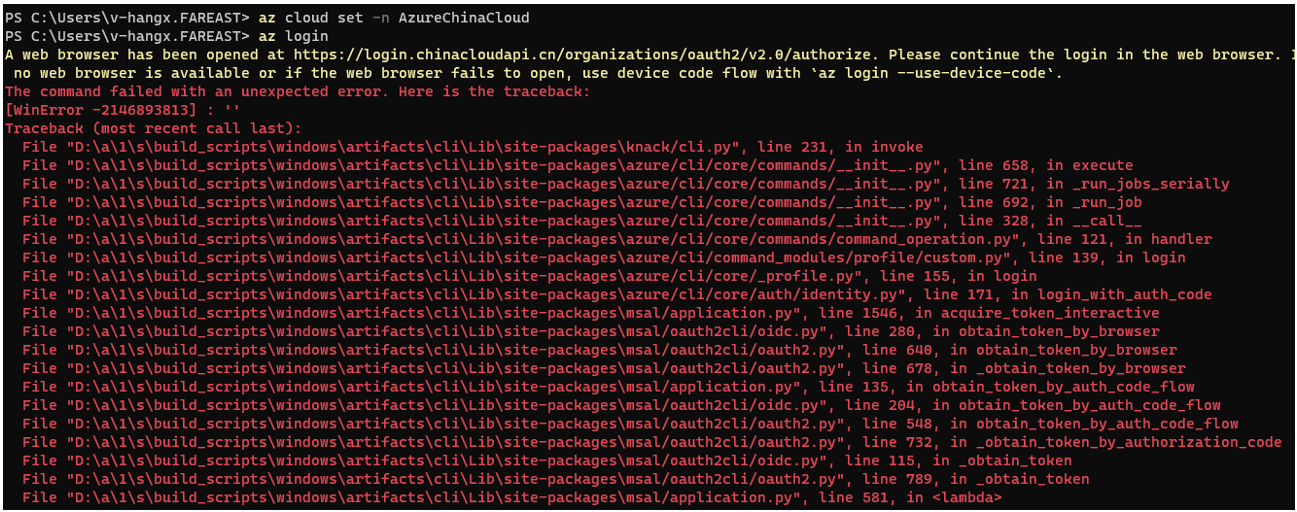
- 有可能是 account credential cache 的问题:
az loginfails: OSError: [WinError -2146893813] · Issue #20231 · Azure/azure-cli · GitHub - 尝试:
az account clear
订阅管理
How to manage Azure subscriptions – Azure CLI | Microsoft Learn
#先用user登录:
az login --user hangx@mcpod.partner.onmschina.cn --password
#再切换sub:
az account set --subscription 9ef8a15c-15a2-4ef1-a19b-e31876ab177
AzCopy
AzCopy 概述
Perform copy and sync operations with AzCopy between local and Azure or different storage accounts.
注意:azcopy 使用的是服务器到服务器 Azure backbone 的 API,不占用本地网络带宽。
安装与登录
- 安装:
- 使用 AzCopy v10 将数据复制或移到 Azure 存储 | Azure Docs
-
下载 AzCopy 安装包,把
azcopy.exe路径添加到系统路径。 -
登录:
azcopy login --aad-endpoint https://login.partner.microsoftonline.cn
#打开给定的web,输入给定的device code
用法
从不同的存储账户之间 Copy
- 使用 AzCopy v10 在 Azure 存储帐户之间复制 Blob | Azure Docs
azcopy copy "源URL" "目的URL"
性能优化
通过 Azure 存储优化 AzCopy v10 的性能 | Azure Docs
设置并发数
- 通过 azcopy 命令设置:
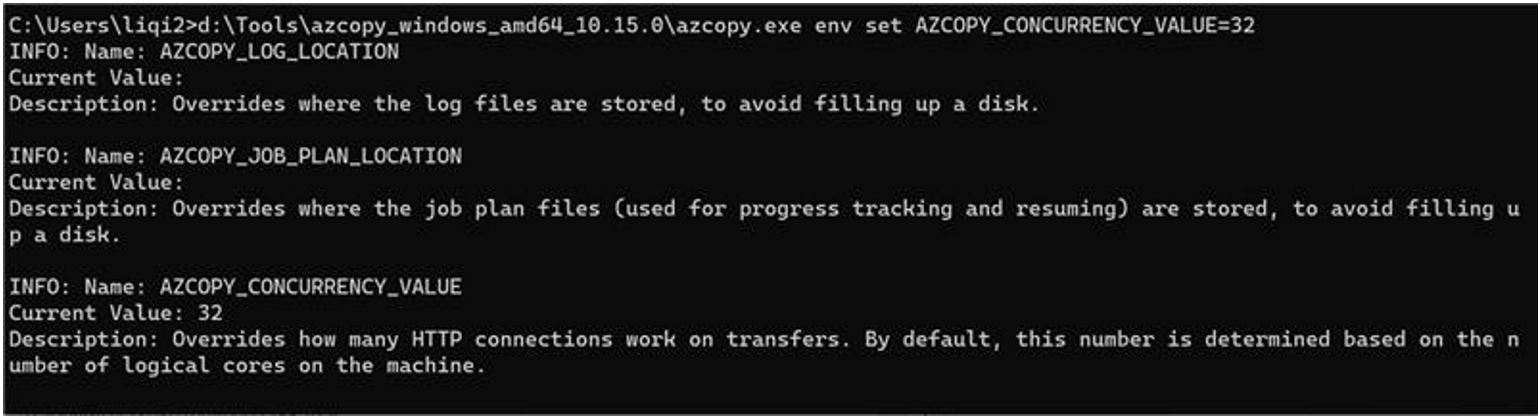
- 通过 PowerShell 设置:
$env:AZCOPY_CONCURRENCY_VALUE=3
AzCopy Sync 降低内存使用
azcopy copy –overwrite=ifSourceNewer