K8s部署GitLab(11.8.1)-基于YAML
搭建nfs供应商
#(1)yum安装nfs,所有节点安装
yum install nfs-utils -y
systemctl start nfs
systemctl enable nfs.service
#(2)在master上创建一个nfs共享目录
mkdir  /data/v3 -p
mkdir  /data/v4
mkdir  /data/v5
tee -a /etc/exports << 'EOF'
/data/v3     *(rw,no_root_squash)
/data/v4     *(rw,no_root_squash)
/data/v5     *(rw,no_root_squash)
EOF
#使配置生效
exportfs -arv
systemctl restart nfs
配置存储
#创建ns
kubectl create ns kube-ops
- 创建gitlab需要的pv和pvc
tee pv-pvc-gitlab.yaml <<'EOF'
apiVersion: v1
kind: PersistentVolume
metadata:
  name: pv-gitlab
spec:
  capacity:
    storage: 2Gi
  accessModes:
  - ReadWriteMany
  persistentVolumeReclaimPolicy: Delete
  nfs:
    server: 192.168.40.180  #nfs服务端ip,即master1节点ip
    path: /data/v5
---
kind: PersistentVolumeClaim
apiVersion: v1
metadata:
  name: pvc-gitlab
  namespace: kube-ops
spec:
  accessModes:
  - ReadWriteMany
  resources:
    requests:
      storage: 2Gi
EOF
kubectl apply -f pv-pvc-gitlab.yaml
- 创建postgresql需要的pv和pvc
tee pv-pvc-postsql.yaml <<'EOF'
apiVersion: v1
kind: PersistentVolume
metadata:
  name: pv-postsql
spec:
  capacity:
    storage: 2Gi
  accessModes:
  - ReadWriteMany
  persistentVolumeReclaimPolicy: Delete
  nfs:
    server: 192.168.40.180
    path: /data/v4
---
kind: PersistentVolumeClaim
apiVersion: v1
metadata:
  name: pvc-postsql
  namespace: kube-ops
spec:
  accessModes:
  - ReadWriteMany
  resources:
    requests:
      storage: 2Gi
EOF
kubectl apply -f pv-pvc-postsql.yaml
- 创建redis需要的pv和pvc
tee pv-pvc-redis.yaml <<'EOF'
apiVersion: v1
kind: PersistentVolume
metadata:
  name: pv-redis
spec:
  capacity:
    storage: 2Gi
  accessModes:
  - ReadWriteMany
  persistentVolumeReclaimPolicy: Delete
  nfs:
    server: 192.168.40.180
    path: /data/v3
---
kind: PersistentVolumeClaim
apiVersion: v1
metadata:
  name: pvc-redis
  namespace: kube-ops
spec:
  accessModes:
  - ReadWriteMany
  resources:
    requests:
      storage: 2Gi
EOF
kubectl apply -f pv-pvc-redis.yaml
- 检查pvc绑定情况
kubectl get pvc -n kube-ops
安装postgresql服务
tee dep-postgresql.yaml <<'EOF'
apiVersion: apps/v1
kind: Deployment
metadata:
  name: postgresql
  namespace: kube-ops
  labels:
    name: postgresql
spec:
  selector:
    matchLabels:
       name: postgresql
  template:
    metadata:
      name: postgresql
      labels:
        name: postgresql
    spec:
      containers:
      - name: postgresql
        image: sameersbn/postgresql:10
        imagePullPolicy: IfNotPresent
        env:
        - name: DB_USER
          value: gitlab
        - name: DB_PASS
          value: passw0rd
        - name: DB_NAME
          value: gitlab_production
        - name: DB_EXTENSION
          value: pg_trgm
        ports:
        - name: postgres
          containerPort: 5432
        volumeMounts:
        - mountPath: /var/lib/postgresql
          name: data
        livenessProbe:
          exec:
            command:
            - pg_isready
            - -h
            - localhost
            - -U
            - postgres
          initialDelaySeconds: 30
          timeoutSeconds: 5
        readinessProbe:
          exec:
            command:
            - pg_isready
            - -h
            - localhost
            - -U
            - postgres
          initialDelaySeconds: 5
          timeoutSeconds: 1
      volumes:
      - name: data
        persistentVolumeClaim:
          claimName: pvc-postsql
---
apiVersion: v1
kind: Service
metadata:
  name: svc-postgresql
  namespace: kube-ops
  labels:
    name: postgresql
spec:
  selector:
    name: postgresql
  ports:
  - name: postgres
    port: 5432
    targetPort: postgres
EOF
kubectl apply -f dep-postgresql.yaml
安装redis服务
tee gitlab-redis.yaml <<'EOF'
apiVersion: apps/v1
kind: Deployment
metadata:
  name: redis
  namespace: kube-ops
  labels:
    name: redis
spec:
  selector:
    matchLabels:
      name: redis
  template:
    metadata:
      name: redis
      labels:
        name: redis
    spec:
      containers:
      - name: redis
        image: sameersbn/redis
        imagePullPolicy: IfNotPresent
        ports:
        - name: redis
          containerPort: 6379
        volumeMounts:
        - mountPath: /var/lib/redis
          name: data
        livenessProbe:
          exec:
            command:
            - redis-cli
            - ping
          initialDelaySeconds: 30
          timeoutSeconds: 5
        readinessProbe:
          exec:
            command:
            - redis-cli
            - ping
          initialDelaySeconds: 5
          timeoutSeconds: 1
      volumes:
      - name: data
        persistentVolumeClaim:
          claimName: pvc-redis
---
apiVersion: v1
kind: Service
metadata:
  name: svc-redis
  namespace: kube-ops
  labels:
    name: redis
spec:
  selector:
    name: redis
  ports:
  - name: redis
    port: 6379
    targetPort: redis
EOF
kubectl apply -f gitlab-redis.yaml
安装gitlab服务
tee gitlab.yaml <<'EOF'
apiVersion: apps/v1
kind: Deployment
metadata:
  name: gitlab
  namespace: kube-ops
  labels:
    name: gitlab
spec:
  selector:
    matchLabels:
        name: gitlab
  template:
    metadata:
      name: gitlab
      labels:
        name: gitlab
    spec:
      containers:
      - name: gitlab
        image: sameersbn/gitlab:11.8.1
        imagePullPolicy: IfNotPresent
        env:
        - name: TZ
          value: Asia/Shanghai
        - name: GITLAB_TIMEZONE
          value: Beijing
        - name: GITLAB_SECRETS_DB_KEY_BASE
          value: long-and-random-alpha-numeric-string
        - name: GITLAB_SECRETS_SECRET_KEY_BASE
          value: long-and-RANDOM-ALPHA-NUMERIc-string
        - name: GITLAB_SECRETS_OTP_KEY_BASE
          value: long-and-random-alpha-numeric-string
        - name: GITLAB_ROOT_PASSWORD
          value: admin321
        - name: GITLAB_ROOT_EMAIL
          value: 1003665363@qq.com
        - name: GITLAB_HOST
          value: 192.168.40.180
        - name: GITLAB_PORT
          value: "30852"
        - name: GITLAB_SSH_PORT
          value: "32353"
        - name: GITLAB_NOTIFY_ON_BROKEN_BUILDS
          value: "true"
        - name: GITLAB_NOTIFY_PUSHER
          value: "false"
        - name: GITLAB_BACKUP_SCHEDULE
          value: daily
        - name: GITLAB_BACKUP_TIME
          value: 01:00
        - name: DB_TYPE
          value: postgres
        - name: DB_HOST
          value: postgresql #postgresql的svc
        - name: DB_PORT
          value: "5432"
        - name: DB_USER
          value: gitlab
        - name: DB_PASS
          value: passw0rd
        - name: DB_NAME
          value: gitlab_production
        - name: REDIS_HOST
          value: redis #redis svc
        - name: REDIS_PORT
          value: "6379"
        ports:
        - name: http
          containerPort: 80
        - name: ssh
          containerPort: 22
        volumeMounts:
        - mountPath: /home/git/data
          name: data
        livenessProbe:
          httpGet:
            path: /
            port: 80
          initialDelaySeconds: 180
          timeoutSeconds: 5
        readinessProbe:
          httpGet:
            path: /
            port: 80
          initialDelaySeconds: 5
          timeoutSeconds: 1
      volumes:
      - name: data
        persistentVolumeClaim:
          claimName: pvc-gitlab
---
apiVersion: v1
kind: Service
metadata:
  name: svc-gitlab
  namespace: kube-ops
  labels:
    name: gitlab
spec:
  type: NodePort
  selector:
    name: gitlab
  ports:
  - name: http
    port: 80
    targetPort: http
    nodePort: 30852
  - name: ssh
    port: 22
    nodePort: 32353
    targetPort: ssh
EOF
kubectl apply -f gitlab.yaml
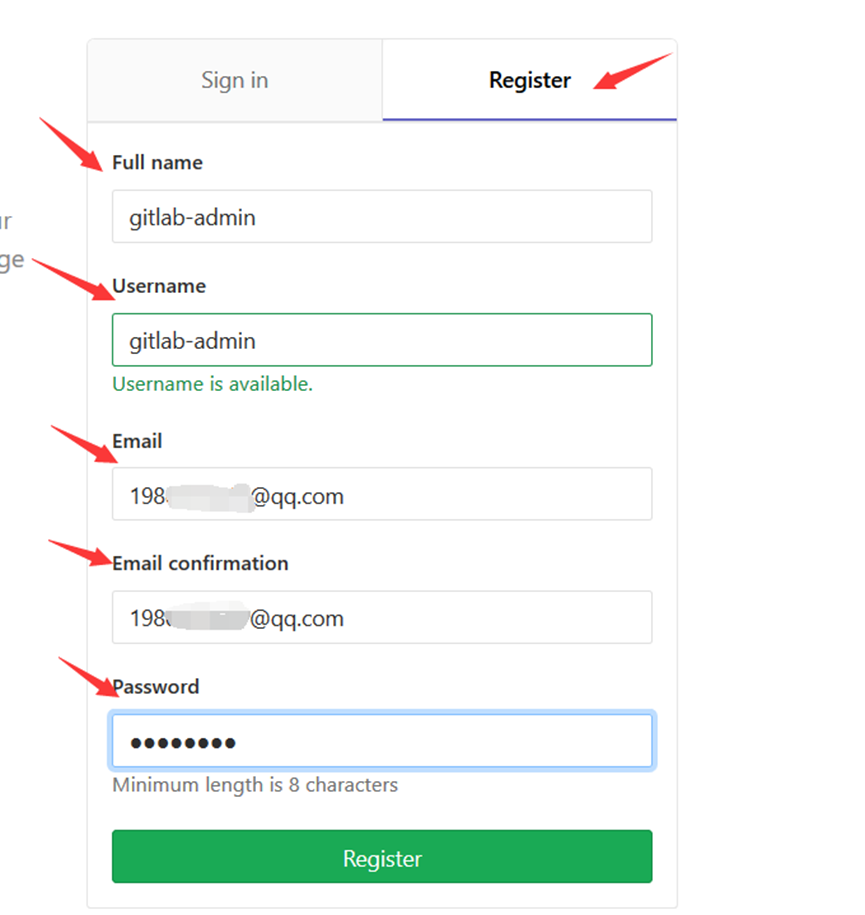
访问gitlab UI界面
-
查看gitlab svc的物理机映射端口
kubectl get svc svc-gitlab -n kube-ops,浏览器访问物理机IP和端口即可访问UI界面 -
初次登录需要Register,username和password随便起。